| |

Darkseeker
|
Judgement - .mainscreen5 { Background: url(insert img link); Background-repeat: no-repeat; } Size: 900 x 100 / 900 x 150 whichever works better for you |
|  |
|
| |
Darkseeker
|
@Husky So that's the same code that I have down, but it doesn't seem to be working. This is the image I have, it's a postimage source, is that the issue? |
|
|
| |
Darkseeker
|
@Judgement try this for the header image instead. postimg links work fine /*-------------------------------------------------- Header Image --------------------------------------------------*/
.col-md-7 {content: url(IMAGE URL HERE); width: 40%; } |
|
|
| |
Darkseeker
|
When you upload to postimg, open the image in a new tab twice then use that url for the code
Judgement said:
@Husky So that's the same code that I have down, but it doesn't seem to be working. This is the image I have, it's a postimage source, is that the issue?
|
| |
|
| |
Darkseeker
|
Still looking for answers on these, unfortunately. </3
Night Shade said:
Is there a code for the packs online and friends online pages? They seem to be broken for most custom palettes. ° Also what is the code for the background for the mobile version and is it in the default code?
|
|
|
| |
Darkseeker
|
I finally got the header to work, thanks all! Next question: | Is there any way to move my wolf header down an inch so that my image is sitting directly on the navigation bar? | |
|
|
| |
Game Moderator
Lightbringer
|
Questions I Have - What's the code to change our headers? (The new WolfPlay logo) - Is the Packs / Friends Online page broken or is there a new code for them? (Asked previously by Night Shade, thanks!) - What's the new code for the giant tree background? The old code no longer works for me. Unanswered Questions I Found - For the footer images, what is the pixel size limit? - How would we go about positioning the headers? (For example: on top of the navigation bar, centered, etc.) - How do we make the footer images different images (left 1, right 2)? - Anyone know the code for this line of text here?
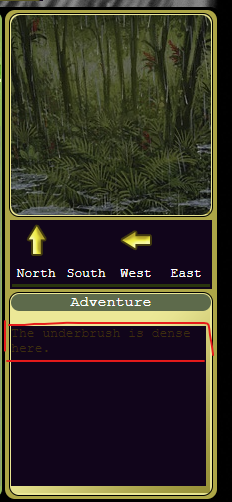 - how do you change the colour of those brown lines on your wolf page and how do you change the colour on 'event and games' once you hover over it? - I have a gap between my navbar box and drop down menu. I can't use my drop down menu because it disappears when I move the cursor to the circled area. I'm not sure how to fix this without deleting everything and starting again. Is it because its hidden behind the weather/mush/apple bar? - I need help finding the background image change thing, or something. I have bad eyesight so I might have skipped over it...all I see is changing colors for the background? Self-reminder to read from pages 23 and before. |
|  |
|
| |
Darkseeker
|
So this works for desktop, but I can't seem to get the code to work for mobile. Is there a different code I should be using?
distant-lands said:
@Judgement try this for the header image instead. postimg links work fine /*-------------------------------------------------- Header Image --------------------------------------------------*/
.col-md-7 {content: url(IMAGE URL HERE); width: 40%; }
|
|
|
| |
Darkseeker
|
i only use desktop so i wouldn't know, sorry :') |
|
|
| |
Darkseeker
|
Dang, lol I primarily use mobile, but code on desktop. :( |
|
|

 Fall Month: 1
  Day
Day  Light Rain


