| |
Neutral
|
Okino said:
Stxrmmix, this is what I saw while digging through this thread. I haven't used this coding myself though, so I'm not sure how much this helps you.
Venerixen said:
Also is there a way to code your mouse cursor to be different with your pallette? I think there is as I've seen someone's pallette with a different one.
This would help * {cursor: url(INSERT CURSOR IMAGE LINK 1),auto;}
a:-webkit-any-link {cursor: url(INSTERT CURSOR IMAGE LINK 2),auto;}
.bsmalltext a:link {cursor: url(INSERT CURSOR IMAGE LINK 3),auto;}
.bsmalltext a:visited {cursor: url(INSERT CURSOR IMAGE LINK 3),auto;}
.iclass {cursor: auto;}
a:-webkit-any-link is for links but you can specify it more by adding it in specific selectors (eg bsmalltext)
"INSERT CURSOR IMAGE LINK X" is the link of the cursor you want to be displayed in your palette.
Thank you! :D |
|
|
| |
Neutral
|
Heyy, I just finished making my s/o's pallet, and I sort of messed up on the text, making it pure black instead of dark orange or red, is there anyway to fix that? >.< |
|
|
| |
Darkseeker
|
You're gonna have to re-read your entire palette and see what text got changed. Otherwise, if you shoot me your code and what text color you're trying to change, I might be able to diagnose it. |
|
|
| |
Neutral
|
Venn - ;> Alright, thank you I'll try and figure it out and if I'm unable too, I'll send it over ^^' Update: Eno managed to fix the pallet. :) |
|
|
| |
Neutral
|
for anyone who doesn't like the new buttons and wants them back how they were before, here's code that will do that: .wpbutton { font-family:arial,sans-serif; font-size:15px; color:#000000; background-color:rgba(0,0,0,0); padding:0px; border:0px; border-radius:0px; border: 0px solid #000000; }
.wpbutton a:visited { font-family:arial,sans-serif; font-size:15px; color:#000000; background-color:rgba(0,0,0,0); padding:0px; }
.wpbutton a:link { font-family:arial,sans-serif; font-size:15px; color:#000000; background-color:rgba(0,0,0,0); padding:0px; }
.wpbutton a:hover { font-family:arial,sans-serif; font-size:15px; color:#000000; background-color:rgba(0,0,0,0); padding:0px; } just edit the text colours to how yours are |
|
|
| |
Darkseeker
|
has anyone else figured out which code it is for the hover on the sales history link? I thought it was the .wpbutton a:hover but that doesn't seem to work :/ |
|
|
| |
Darkseeker
|
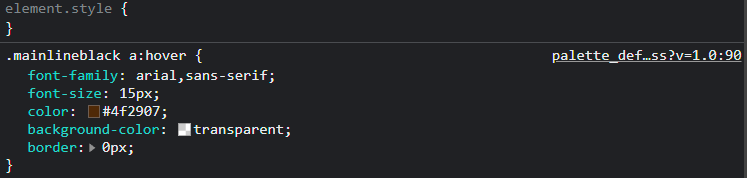
Eno - I took a quick look as I currently dont have time to be editing palettes. It seems weird, but this seems to work: |
|
|
| |
Darkseeker
|
Vennenum said:
Eno - I took a quick look as I currently dont have time to be editing palettes. It seems weird, but this seems to work: Oooh yes, I forgot to add that. Thanks a bunch ^^ |
|
|
| |

Darkseeker
|
I have read through this and I may have missed it on accident. '^^
The vio text and the text up where your pack information like join date and such, I can not figure out how to change the color of it so I can see it better on my current palette. If I have missed this I am sorry, but I could really use the help. |
|  |
|
| |
Darkseeker
|
.mainline { color: #000000; } That should be the code for both of those, I think?
Frozen Mist said:
I have read through this and I may have missed it on accident. '^^
The vio text and the text up where your pack information like join date and such, I can not figure out how to change the color of it so I can see it better on my current palette. If I have missed this I am sorry, but I could really use the help.
|
|
|

 Winter Month: 1
  Night
Night  Blizzard Moon: