| |
Neutral
|
new question lmao: that code did work, but there's still a section of it showing on the page part. |
|
|
| |
Darkseeker
|
How big is your header image?
queen. said:
new question lmao: that code did work, but there's still a section of it showing on the page part.
|
|
|
| |
Neutral
|
bigger than it should be, i don't know the exact size. should i resize it to the exact size of what the header should be to prevent it from going onto the page?
Fair Phantom said:
How big is your header image?
queen. said:
new question lmao: that code did work, but there's still a section of it showing on the page part.
|
|
|
| |
Darkseeker
|
Yes, it needs to be 900 x 200. :) Try that.
queen. said:
bigger than it should be, i don't know the exact size. should i resize it to the exact size of what the header should be to prevent it from going onto the page?
Fair Phantom said:
How big is your header image?
queen. said:
new question lmao: that code did work, but there's still a section of it showing on the page part.
|
|
|
| |
Neutral
|
will do! thank you for the help :)
Fair Phantom said:
Yes, it needs to be 900 x 200. :) Try that.
queen. said:
bigger than it should be, i don't know the exact size. should i resize it to the exact size of what the header should be to prevent it from going onto the page?
Fair Phantom said:
How big is your header image?
queen. said:
new question lmao: that code did work, but there's still a section of it showing on the page part.
|
|
|
| |
Darkseeker
|
No problem! ^^
queen. said:
will do! thank you for the help :)
Fair Phantom said:
Yes, it needs to be 900 x 200. :) Try that.
queen. said:
bigger than it should be, i don't know the exact size. should i resize it to the exact size of what the header should be to prevent it from going onto the page?
Fair Phantom said:
How big is your header image?
queen. said:
new question lmao: that code did work, but there's still a section of it showing on the page part.
|
|
|
| |
Neutral
|
it worked! thanks again :) |
|
|
| |
Darkseeker
|
You're welcome! :)
queen. said:
it worked! thanks again :)
|
|
|
| |
Neutral
|
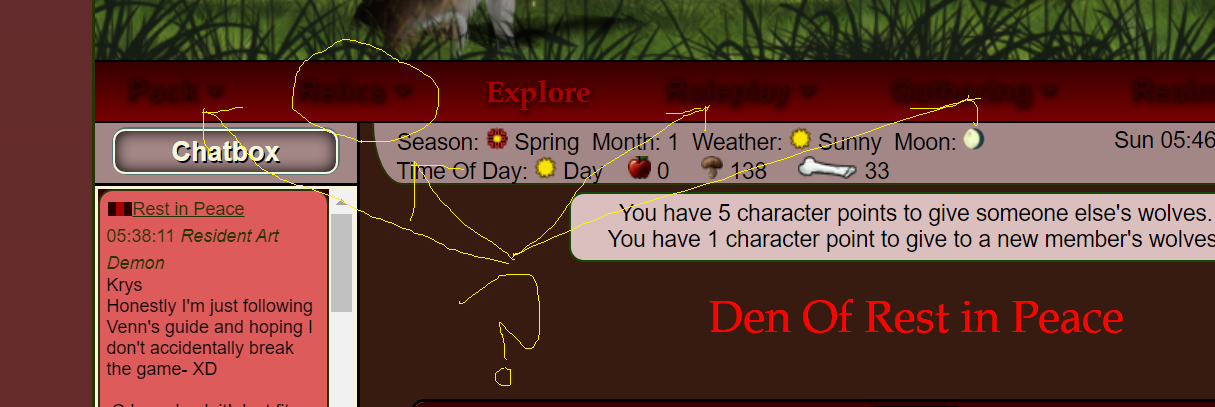
How do I change the font and color of this part? I somehow only did so for the Explore button and den page, I'd like for these to also be in the Book Antiqua font. It looks a little out of place with just the explore text red. |
|
|
| |
Neutral
|
Nevermind, figured that part out! Though, I am still having problems changing the website text color..? For instance, for Pack life, and the den slots thing, and text everywhere is still black, and with a black background it's impossible to read unless I highlight it TwT Is there a code for that? |
|
|

 Summer Month: 3
  Night
Night  Heavy Rain Moon: