Wolf Play Game

Wolf Play Game
 Fall Month: 1   Night   Clear  Moon: 
      
Sun 08:30am  
Packs Online:  54 
Chatbox
 Kiana
08:29:17 
i see that several of you have things like pronouns directly after your name but before your message in chat. how do i change mine?
 Nero
08:28:48 I am a female <3
Chara
Believe me you my heart was racing xD
 FireWeaver
08:27:48 DH Obsessed
Morning everyone!
 Doodle Dragon
08:20:22 He/They pronouns
Good morning chat! ^^
 Charalander
08:18:35 Chara
Nero,
Russian roulette feeling for sure
 Nero
08:14:25 I am a female <3
I had 4 dyes unburired and 2 jasmine and the stolen relic notification came up oh my
 Charalander
07:40:38 Chara
I got premium through the FMC, I'm very happy :)
 Cypress Road
07:23:42 Axan hoarder
Well hopefully imma crash out in about 15 hours and not have insomnia hit hard and stay up all night. By peeps. Gonna go start my day
 Cypress Road
07:13:41 Axan hoarder
See ya later
 Night Raven College
07:12:52 NRC/Night/Raven
And have fun.
 Night Raven College
07:12:39 NRC/Night/Raven
Well I gotta go, see you later(:
 Cypress Road
07:12:21 Axan hoarder
And the sun is coming up. Yay me. I get to do a bunch of shit including doing a pregnancy test on my dog
 Night Raven College
07:09:47 NRC/Night/Raven
Cypress
Cool.
 Cypress Road
07:08:05 Axan hoarder
Night
I started with free hand copying and have worked my way from there. Just recently got into digital
 Night Raven College
07:06:42 NRC/Night/Raven
But it's not a straight copy.
 Night Raven College
07:06:21 NRC/Night/Raven
I like free handing, what I do is fine these pictures on the web and print them off and copy them and add my own touchs.
 Cypress Road
07:04:50 Axan hoarder
Ive practiced so much and learned that I can free hand whatever im looking at. Also found out I can copy people's handwriting just looking at them.
 Night Raven College
07:00:46 NRC/Night/Raven
Went*
 Night Raven College
07:00:36 NRC/Night/Raven
Same here but I never knew how to draw, then one day I sent to youtube and just watched tutorials. Now I love drawing:D
 Cypress Road
06:59:36 Axan hoarder
Ive loved drawing my whole life.

Refresh

You must be a registered member for more
than 1 day before you can use our chatbox.


Quests

Embark on a Quest.

Alliance Battles

Join an Alliance.

Challenges

Hourly Damage Variances
Green Python : +1
Komodo Dragon : +4
Polar Bear : +4


WolfPlay Game
Chatbox
 Kiana
08:29:17 
i see that several of you have things like pronouns directly after your name but before your message in chat. how do i change mine?
 Nero
08:28:48 I am a female <3
Chara
Believe me you my heart was racing xD
 FireWeaver
08:27:48 DH Obsessed
Morning everyone!
 Doodle Dragon
08:20:22 He/They pronouns
Good morning chat! ^^
 Charalander
08:18:35 Chara
Nero,
Russian roulette feeling for sure
 Nero
08:14:25 I am a female <3
I had 4 dyes unburired and 2 jasmine and the stolen relic notification came up oh my
 Charalander
07:40:38 Chara
I got premium through the FMC, I'm very happy :)
 Cypress Road
07:23:42 Axan hoarder
Well hopefully imma crash out in about 15 hours and not have insomnia hit hard and stay up all night. By peeps. Gonna go start my day
 Cypress Road
07:13:41 Axan hoarder
See ya later
 Night Raven College
07:12:52 NRC/Night/Raven
And have fun.
 Night Raven College
07:12:39 NRC/Night/Raven
Well I gotta go, see you later(:
 Cypress Road
07:12:21 Axan hoarder
And the sun is coming up. Yay me. I get to do a bunch of shit including doing a pregnancy test on my dog
 Night Raven College
07:09:47 NRC/Night/Raven
Cypress
Cool.
 Cypress Road
07:08:05 Axan hoarder
Night
I started with free hand copying and have worked my way from there. Just recently got into digital
 Night Raven College
07:06:42 NRC/Night/Raven
But it's not a straight copy.
 Night Raven College
07:06:21 NRC/Night/Raven
I like free handing, what I do is fine these pictures on the web and print them off and copy them and add my own touchs.
 Cypress Road
07:04:50 Axan hoarder
Ive practiced so much and learned that I can free hand whatever im looking at. Also found out I can copy people's handwriting just looking at them.
 Night Raven College
07:00:46 NRC/Night/Raven
Went*
 Night Raven College
07:00:36 NRC/Night/Raven
Same here but I never knew how to draw, then one day I sent to youtube and just watched tutorials. Now I love drawing:D
 Cypress Road
06:59:36 Axan hoarder
Ive loved drawing my whole life.


Refresh

You must be a member for more than 1 day before you can chat.

Forums

→ WolfPlay is a fun game! Sign Up Now!


My Subscriptions
My Bookmarks
My Topics
Latest Topics
Following

Forums > Member Help > Guides
   1    2 

Pelt Contest GuideDecember 30, 2024 11:21 PM


Purgatory

Darkseeker
 
Posts:176
#3078629
Give Award

13
Hey fellow WPers, have you ever wanted to enter one of the pelt contests but were unsure of how to go about it? Look no further, here is a short guide!
-+-+-
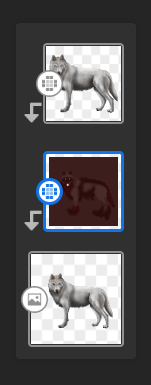
1st - Download the image of the wolf on the forum page (It has a transparent background, you'll want to preserve that element for later on, so make sure to use png for best results)
2nd - Upload the wolf image to a layer in your art app for the base layer.
3rd - Create a new layer on top and leave this blank for now, it will be where you make your design
4th - Upload the image of the wolf to a third layer on top of both of the others. Set this layer to either overlay, soft light, or multiply - something to blend it so that it preserves WPs natural shading and lines without obscurring your lovely artwork.
-+-+-
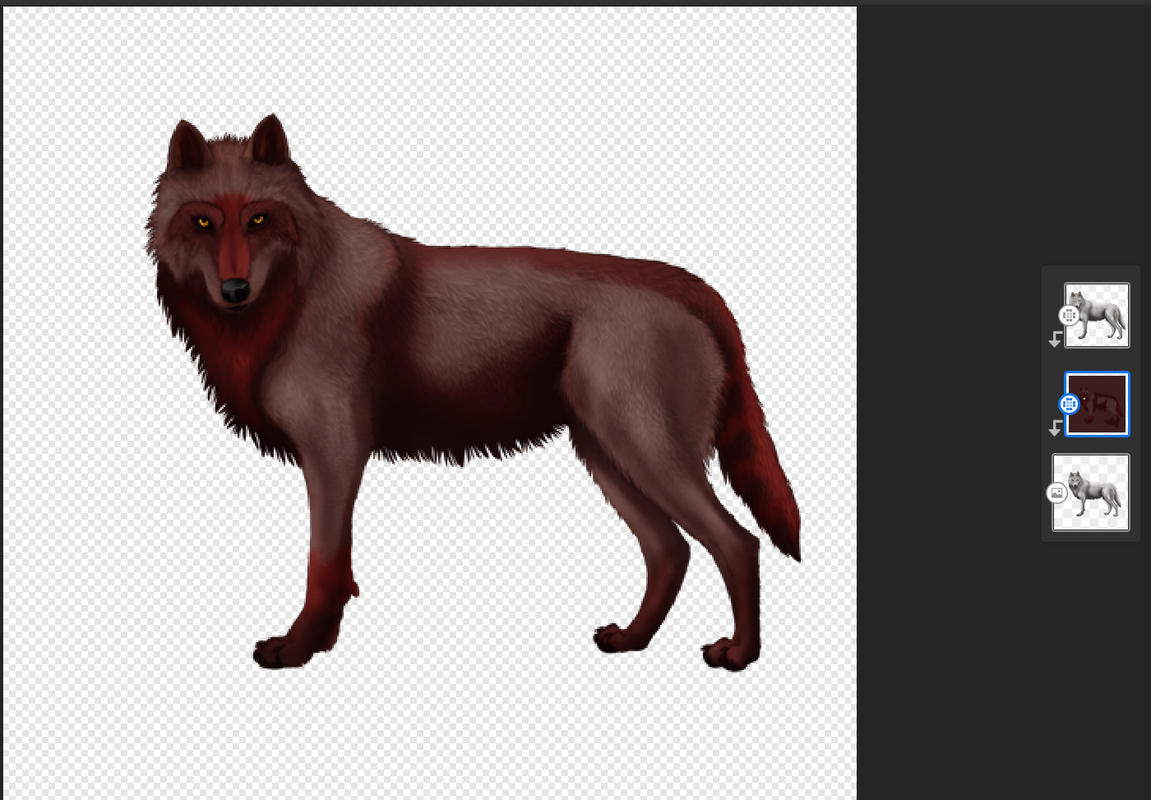
__________ Pelt Displayed: Bloodborn __________
Screenshot-2024-12-30-214611.png
Additional Tips:
Avoid rough color blocks by using a smoothening tool or airbrush
Follow the flow of the fur when making intricate markings, this will aid realism
Snap the top layers of your design to the original base image to avoid color from spilling over from the pelt to the background
Erase the eyes and nose from your design to make them pop against the new colors
Beginner's Software Suggestion:
Adobe Fresco - A free to use, multi-capable art host that can be downloaded on almost any device. You will be able to follow my guide more closely using it. It is also compatible with mouse, pen, and finger painting. There is a built-in tutorial to the app that quickly and easily trains users the basics. Up to 20 free layers and downloadable brush packs for no surcharge.
*This is not a paid advert, I just enjoy the app lol

Edited at January 5, 2025 05:49 PM by Purgatory
Pelt Contest GuideDecember 30, 2024 11:51 PM


SixBears

Administrator
Lightbringer
 
Posts:5107
#3078636
Give Award
Thank you, this should help members a lot.
Pelt Contest GuideDecember 31, 2024 12:09 AM


Alchemist

Darkseeker
 
Posts:278
#3078638
Give Award
I will be using these tips! Thank you so much :D
Pelt Contest GuideDecember 31, 2024 10:26 AM


snake

Darkseeker
 
Posts:3574
#3078679
Give Award
oh cool! Thanks so much :D
Pelt Contest GuideJanuary 1, 2025 01:32 AM


Serpents

Lightbringer
 
Posts:4951
#3078798
Give Award
thanks this helps as I have been asking for so long How others get so nice pelts :D Ill be using this for every pelt now, how do I erase the eyes and nose? as I think I did it wrong I no cant get them back?

Edited at January 1, 2025 02:54 PM by Serpents
Pelt Contest GuideJanuary 1, 2025 03:47 PM


Graywing

Darkseeker
 
Posts:1175
#3078848
Give Award

Serpents said:
thanks this helps as I have been asking for so long How others get so nice pelts :D Ill be using this for every pelt now, how do I erase the eyes and nose? as I think I did it wrong I no cant get them back?


erase the eyes and nose on the color layer, that way the normal eyes and nose will be there
EDIT: 2025-01-01-0qd-Kleki.png
like this

Edited at January 1, 2025 03:50 PM by Graywing
Pelt Contest GuideJanuary 2, 2025 07:32 PM


Serpents

Lightbringer
 
Posts:4951
#3079023
Give Award

Graywing said:

Serpents said:
thanks this helps as I have been asking for so long How others get so nice pelts :D Ill be using this for every pelt now, how do I erase the eyes and nose? as I think I did it wrong I no cant get them back?


erase the eyes and nose on the color layer, that way the normal eyes and nose will be there
EDIT: 2025-01-01-0qd-Kleki.png
like this


ah thanks nother question How do I not get leaks on the color layer?
Pelt Contest GuideJanuary 2, 2025 09:03 PM


Graywing

Darkseeker
 
Posts:1175
#3079037
Give Award

Serpents said:

Graywing said:

Serpents said:
thanks this helps as I have been asking for so long How others get so nice pelts :D Ill be using this for every pelt now, how do I erase the eyes and nose? as I think I did it wrong I no cant get them back?


erase the eyes and nose on the color layer, that way the normal eyes and nose will be there
EDIT: 2025-01-01-0qd-Kleki.png
like this


ah thanks nother question How do I not get leaks on the color layer?


Lower the tolerance level
Pelt Contest GuideJanuary 2, 2025 09:32 PM


Serpents

Lightbringer
 
Posts:4951
#3079040
Give Award

Graywing said:

Serpents said:

Graywing said:

Serpents said:
thanks this helps as I have been asking for so long How others get so nice pelts :D Ill be using this for every pelt now, how do I erase the eyes and nose? as I think I did it wrong I no cant get them back?


erase the eyes and nose on the color layer, that way the normal eyes and nose will be there
EDIT: 2025-01-01-0qd-Kleki.png
like this


ah thanks nother question How do I not get leaks on the color layer?


Lower the tolerance level


so Like the Brush size
Pelt Contest GuideJanuary 2, 2025 11:15 PM


Tartarus

Darkseeker
 
Posts:1819
#3079060
Give Award
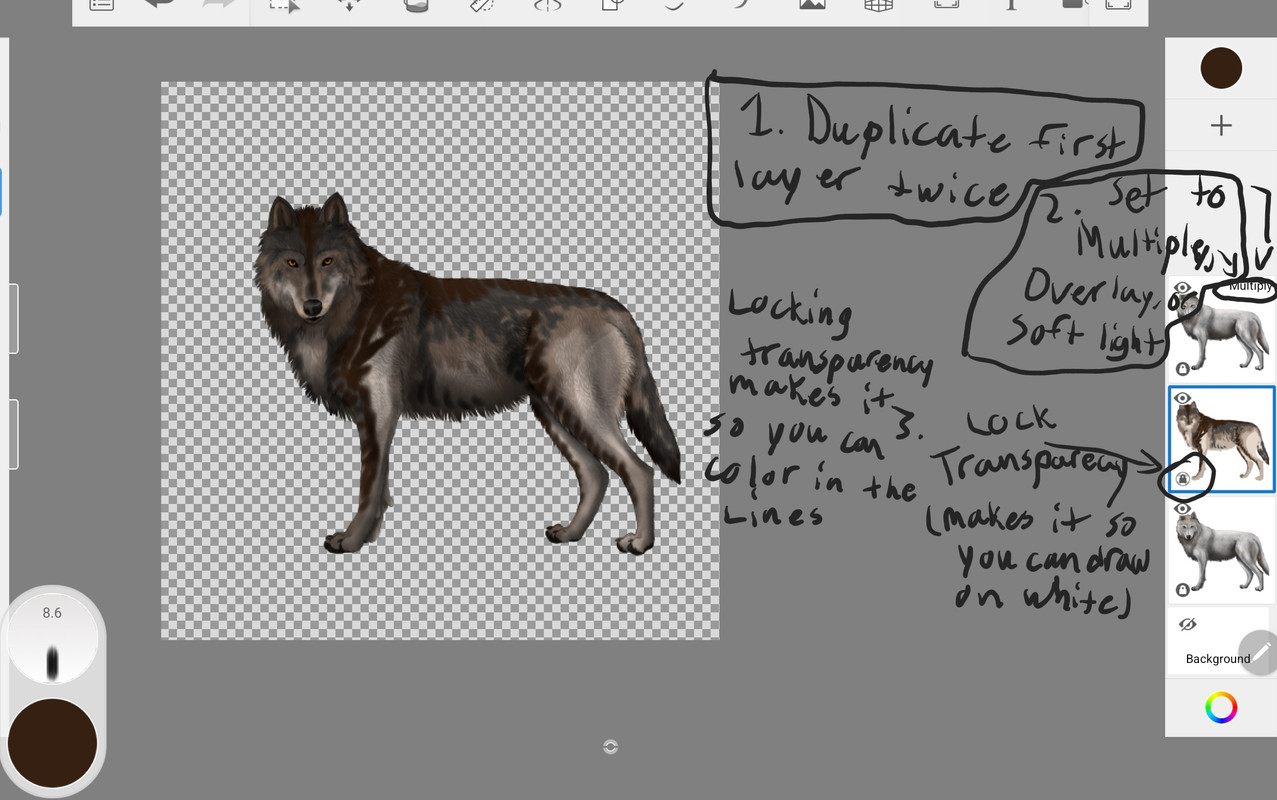
I tried to explain it in this image but I don't know if it would make sense. You can also lock transparency on the top layer which has your blending setting and draw on the top layer. It works just as well. Also, I find using multiply works the best. I can try to help explain further if this doesn't help.

Serpents said:

Graywing said:

Serpents said:

Graywing said:

Serpents said:
thanks this helps as I have been asking for so long How others get so nice pelts :D Ill be using this for every pelt now, how do I erase the eyes and nose? as I think I did it wrong I no cant get them back?


erase the eyes and nose on the color layer, that way the normal eyes and nose will be there
EDIT: 2025-01-01-0qd-Kleki.png
like this


ah thanks nother question How do I not get leaks on the color layer?


Lower the tolerance level


so Like the Brush size


Forums > Member Help > Guides
   1    2 

Refresh