Wolf Play Game

Wolf Play Game
 Fall Month: 3   Day   Sunny
    

Chatbox
 SixBears
11:45:38 evebot
Well, you're on an ipad so I guess it will show desktop view no matter what.
 Siku of Kinapak
11:44:08 Siku
I just tried turning off "set desktop view" but no matter which position it is in, my device continues to show desktop view. it says (for mobile devices). Is there another way I am supposed to do it?
 SixBears
11:40:57 evebot
Can you try it without desktop view and see if you have the same problem?
 Siku of Kinapak
11:40:25 Siku
I am using desktop view. zooming in and out is only to get the button to finally trigger after pressing it. I am not normally zoomed in/out.
 Siku of Kinapak
11:39:14 Siku
all wolves.
 SixBears
11:38:54 evebot
Also, do you have it zoomed out/in or are you using desktop view?
 SixBears
11:38:30 evebot

Is it happening on all wolves, or only certain wolves?
 Siku of Kinapak
11:37:22 Siku
Any browser. I've tried it in every browser I have.
 Siku of Kinapak
11:36:49 Siku
After testing, the other links (bloodlines, affinity, offspring, stalk) all work just fine. It is only the manage wolf button that glitches.
 SixBears
11:36:38 evebot
Which browser are you using?
 SixBears
11:36:26 evebot
Is it happening on all wolves, or only certain wolves?
 Siku of Kinapak
11:34:34 Siku
I haven't tried those other links specifically, but out of the links I use regularly I have only noticed it in the manage wolf link. Let me check the others now...

And as for what it's doing, it is possible to get it to open but requires pressing the manage wolf button , then zooming in zooming out, scrolling around the page multiple times... eventually it will open, but the amount of work and time it takes isn't worth it.
 SixBears
11:31:14 evebot
Is it just not opening?  Are the other links (Offspring, Pedigree, etc) not working for you?
 SixBears
11:30:04 evebot
Is it just not opening?
 Siku of Kinapak
11:28:58 Siku
Thank you so much Eve!
 SixBears
11:28:10 evebot
This will be at the top of my list to fix.
 Siku of Kinapak
11:26:28 Siku
@Eve I have an ipad pro 11 inch.
 Siku of Kinapak
11:26:04 Siku
issue started a couple of weeks ago.
 SixBears
11:25:54 evebot
what type of ipad do you have?
 Siku of Kinapak
11:25:16 Siku
On PC it works fine. But on ipad, the manage wolf button is super glitchy and hard to get to work.

Refresh

You must be a registered member for more
than 1 day before you can use our chatbox.


Quests

Embark on a Quest.

Alliance Battles

Join an Alliance.

Challenges

Hourly Damage Variances
Bobcat : +1
Jaguar : 0
Komodo Dragon : -5


WolfPlay Game
Chatbox
 SixBears
11:45:38 evebot
Well, you're on an ipad so I guess it will show desktop view no matter what.
 Siku of Kinapak
11:44:08 Siku
I just tried turning off "set desktop view" but no matter which position it is in, my device continues to show desktop view. it says (for mobile devices). Is there another way I am supposed to do it?
 SixBears
11:40:57 evebot
Can you try it without desktop view and see if you have the same problem?
 Siku of Kinapak
11:40:25 Siku
I am using desktop view. zooming in and out is only to get the button to finally trigger after pressing it. I am not normally zoomed in/out.
 Siku of Kinapak
11:39:14 Siku
all wolves.
 SixBears
11:38:54 evebot
Also, do you have it zoomed out/in or are you using desktop view?
 SixBears
11:38:30 evebot

Is it happening on all wolves, or only certain wolves?
 Siku of Kinapak
11:37:22 Siku
Any browser. I've tried it in every browser I have.
 Siku of Kinapak
11:36:49 Siku
After testing, the other links (bloodlines, affinity, offspring, stalk) all work just fine. It is only the manage wolf button that glitches.
 SixBears
11:36:38 evebot
Which browser are you using?
 SixBears
11:36:26 evebot
Is it happening on all wolves, or only certain wolves?
 Siku of Kinapak
11:34:34 Siku
I haven't tried those other links specifically, but out of the links I use regularly I have only noticed it in the manage wolf link. Let me check the others now...

And as for what it's doing, it is possible to get it to open but requires pressing the manage wolf button , then zooming in zooming out, scrolling around the page multiple times... eventually it will open, but the amount of work and time it takes isn't worth it.
 SixBears
11:31:14 evebot
Is it just not opening?  Are the other links (Offspring, Pedigree, etc) not working for you?
 SixBears
11:30:04 evebot
Is it just not opening?
 Siku of Kinapak
11:28:58 Siku
Thank you so much Eve!
 SixBears
11:28:10 evebot
This will be at the top of my list to fix.
 Siku of Kinapak
11:26:28 Siku
@Eve I have an ipad pro 11 inch.
 Siku of Kinapak
11:26:04 Siku
issue started a couple of weeks ago.
 SixBears
11:25:54 evebot
what type of ipad do you have?
 Siku of Kinapak
11:25:16 Siku
On PC it works fine. But on ipad, the manage wolf button is super glitchy and hard to get to work.


Refresh

You must be a member for more than 1 day before you can chat.

Forums

→ WolfPlay is a fun game! Sign Up Now!


My Subscriptions
My Bookmarks
My Topics
Latest Topics
Following

Forums > Member Help
   1 

 bugJanuary 4, 2018 02:36 PM


Renegades

Neutral
 
Posts:3197
#435929
Give Award
When I type in my wolf’s page (bio, personality, preferences, special skills) and I type a word with an apostrophe in it and I hit submit when I scroll down into what I submitted there is an  character before all apostrophes.

Example: They’re, We’ll, Bob’s, Rob’s

This has occurred for many other players on wolfplay.


 bugJanuary 4, 2018 02:42 PM


Vennenum

Darkseeker
 
Posts:5797
#435943
Give Award
It's not really a bug. It's just your computer/phone typing smart quotes.

If on a phone, disable it in your settings.
If on a computer, retype all your apostrophes (') and quotes (") directly in Wolfplay.
 bugJanuary 4, 2018 04:08 PM


Former Pack

Neutral
 
Posts:0
#436147
Give Award
This also tends to happen if you're copying and pasting from somewhere else. I'll often copy and paste from Docs when posting RP responses and end up with the weird A's.

An easy way to fix this is to edit and then click post without actually changing anything.
 bugJanuary 4, 2018 08:39 PM


Renegades

Neutral
 
Posts:3197
#437060
Give Award


Vennenum said:
It's not really a bug. It's just your computer/phone typing smart quotes.

If on a phone, disable it in your settings.
If on a computer, retype all your apostrophes (') and quotes (") directly in Wolfplay.


I’m typing on an IPad directly into wolfplay, what should I do then?
 bugJanuary 5, 2018 12:54 AM


Vennenum

Darkseeker
 
Posts:5797
#437515
Give Award
@Renegades--
I'm not familiar with iOS software, but in Settings, there should be a feature called "Smart Quotes" or "Smart Keyboard" somewhere. Turn it off.
 bugJune 2, 2021 01:38 PM


Former Pack

Neutral
 
Posts:0
#2559938
Give Award
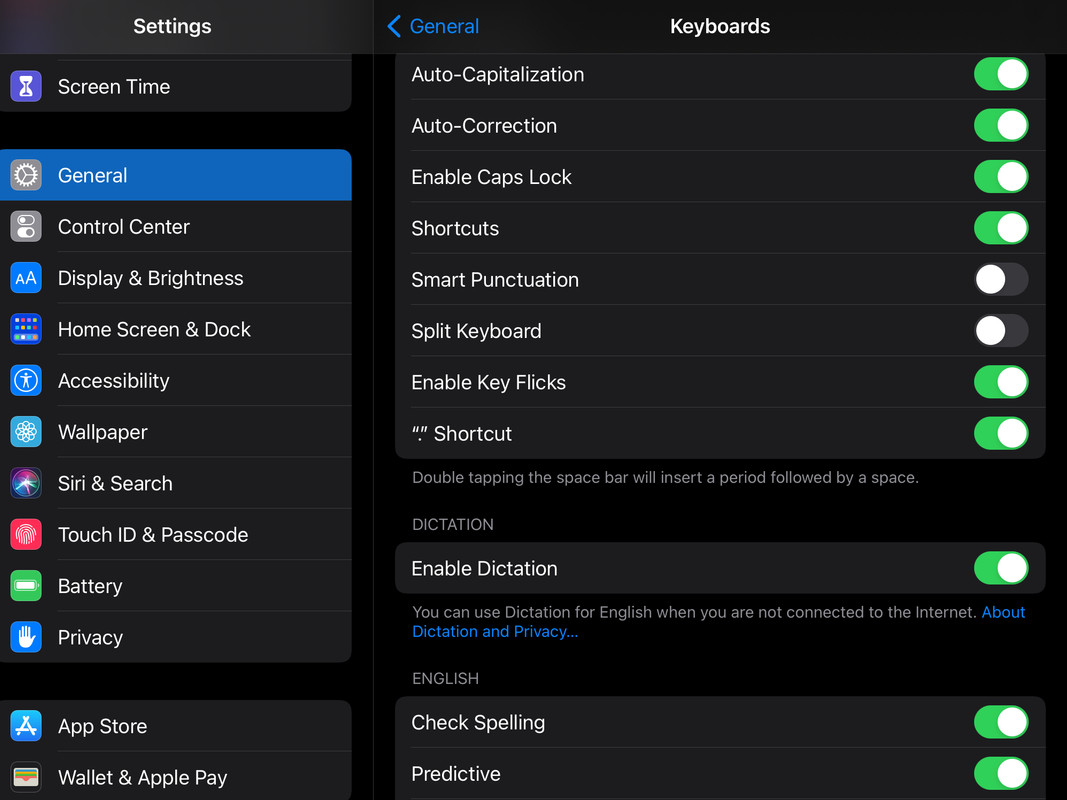
I just fixed my keyboard! On iOS, you go to Settings> General> Keyboards> And then turn off Smart Punctuation.
what a relief! It's been bugging me to death! 😅
 bugJune 2, 2021 10:42 PM


Former Pack

Neutral
 
Posts:0
#2560404
Give Award
On an iPad go to:
Settings>general>Keyboard
then it should have something like this. Hope I helped!

Forums > Member Help
   1 

Refresh