Wolf Play Game

Wolf Play Game
 Spring Month: 3   Night   Clear  Moon: 
      

Chatbox
 Sleep
12:30:27 Kneecap stealer
Can you yell at me to go to sleep please?🥲🥲🥲🥲 One of my old roommates came knocking on the door and woke me up because I put a friends stuff outside (took over an hour she had so much shit) because of some personal stuff she tried to do (kick me out is the main one)
 Sleep
12:28:35 Kneecap stealer
:0 hi eve and yes, thankies it's VERY helpful when you don't have to buy them or find the ingredients to craft them, espically if you have to craft multiple of each
 SixBears
12:24:38 evebot
That was the other day. I thought it would be helpful. :)
 Sleep
12:14:08 Kneecap stealer
When did they add the healing pots in market
 Sleep
12:11:29 Kneecap stealer
I swear if I wake up to a labor notification and I have duds imma scream
 Vulpixles
11:52:46 Pixie, Vul | ♈
Yeah I definitely missed writing. It's been like 4 years
 lovrenee
11:35:25 renee
@Sleep
strange
 Sleep
11:33:20 Kneecap stealer
I was asleep..until someone came Knocking on my back door asking for my boyfriend and now I cannot go back to sleep
 lovrenee
11:20:00 renee
@Sleep
go to SLEEP!
 Sleep
11:18:43 Kneecap stealer
Someone yell at me to go to sleep, I gotta get up early tomorrow to visit my boyfriend
 Sleep
11:17:31 Kneecap stealer
I'm breathing so heavy I'm convinced something is wrong
 Ninjago Realm
11:09:54 Waterfall,Zane,Nya
Zane Julien chokes on their meal.

Mood: Sheepish well done Zane... How do you choke...
 lovrenee
11:01:37 renee
@Lucky Rat
BBQ chips are fire
 Spellbound
11:01:16 miss fine dining
go buy some
 Lucky Rat
10:54:34 Rat/spooky/(he/him)
I want some BBQ chips >:( I’ve been craving them all day |:’(
 Nekros
10:54:19 Kros
RP anybody? PM me!
 Wild Runners
10:11:27 Stalking chat
Making a gif >:)
 Serpents
10:06:13 Waterfall,Zane,Pixal
anyone up for an rp pmme
 Spellbound
10:06:08 miss fine dining
@Knee

When it says she's in labor between hours 82-96 i believe and like a hour or so after that
 Sleep
10:05:12 Kneecap stealer
She's at 73 hours

Refresh

You must be a registered member for more
than 1 day before you can use our chatbox.


Quests

Embark on a Quest.

Alliance Battles

Join an Alliance.

Challenges

Hourly Damage Variances
Western Rattlesnake : 0
Ermine : +3
Green Python : -4


WolfPlay Game
Chatbox
 Sleep
12:30:27 Kneecap stealer
Can you yell at me to go to sleep please?🥲🥲🥲🥲 One of my old roommates came knocking on the door and woke me up because I put a friends stuff outside (took over an hour she had so much shit) because of some personal stuff she tried to do (kick me out is the main one)
 Sleep
12:28:35 Kneecap stealer
:0 hi eve and yes, thankies it's VERY helpful when you don't have to buy them or find the ingredients to craft them, espically if you have to craft multiple of each
 SixBears
12:24:38 evebot
That was the other day. I thought it would be helpful. :)
 Sleep
12:14:08 Kneecap stealer
When did they add the healing pots in market
 Sleep
12:11:29 Kneecap stealer
I swear if I wake up to a labor notification and I have duds imma scream
 Vulpixles
11:52:46 Pixie, Vul | ♈
Yeah I definitely missed writing. It's been like 4 years
 lovrenee
11:35:25 renee
@Sleep
strange
 Sleep
11:33:20 Kneecap stealer
I was asleep..until someone came Knocking on my back door asking for my boyfriend and now I cannot go back to sleep
 lovrenee
11:20:00 renee
@Sleep
go to SLEEP!
 Sleep
11:18:43 Kneecap stealer
Someone yell at me to go to sleep, I gotta get up early tomorrow to visit my boyfriend
 Sleep
11:17:31 Kneecap stealer
I'm breathing so heavy I'm convinced something is wrong
 Ninjago Realm
11:09:54 Waterfall,Zane,Nya
Zane Julien chokes on their meal.

Mood: Sheepish well done Zane... How do you choke...
 lovrenee
11:01:37 renee
@Lucky Rat
BBQ chips are fire
 Spellbound
11:01:16 miss fine dining
go buy some
 Lucky Rat
10:54:34 Rat/spooky/(he/him)
I want some BBQ chips >:( I’ve been craving them all day |:’(
 Nekros
10:54:19 Kros
RP anybody? PM me!
 Wild Runners
10:11:27 Stalking chat
Making a gif >:)
 Serpents
10:06:13 Waterfall,Zane,Pixal
anyone up for an rp pmme
 Spellbound
10:06:08 miss fine dining
@Knee

When it says she's in labor between hours 82-96 i believe and like a hour or so after that
 Sleep
10:05:12 Kneecap stealer
She's at 73 hours


Refresh

You must be a member for more than 1 day before you can chat.

Forums

→ WolfPlay is a fun game! Sign Up Now!


My Subscriptions
My Bookmarks
My Topics
Latest Topics
Following

Forums > Member Help > Guides
   1 

Animating in FireAlpacaJanuary 28, 2018 04:55 AM


Vennenum

Darkseeker
 
Posts:5797
#480658
Give Award

HOW-TO: Make Animations in FireAlpaca

Animations are (obviously) very popular. Pictures that move have always fascinated us. So how does it work?

I'll show you how I make a simple forward animation like I have in my banner (without the blinking part):

animation.gif
What you need to remember is - Each layer on your canvas is one frame in your animation. So you'll have to make each frame individually. As daunting as that sounds, it's actually quite simple once you know what you're doing.

green-light-dark-page-divider-by-thomashir-dan7y1c.png
1 - First off, you'll need to know how layers work. If you know this already, skip ahead to step 3.

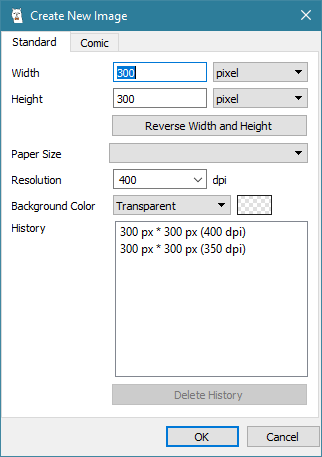
In FireAlpaca, open a new image. I'm going to make the dimensions the typical WP avatar size: 300x300 pixels. I prefer the background color to be transparent, because you can always add a background later.
001-New-Image.png

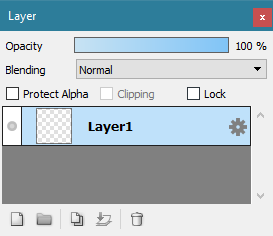
2 - Once your canvas is open, look to where your layers panel is. It should look something like this:
002-Layers.png
These buttons on the bottom left of your layers panel are going to be your friends. Play around with them. Make sure you know what they do. If you mess up on a layer, your whole animation will get messed up.

003-Layer-Buttons.png
Going left to right:
(1) Add Layer
(2) Add Folder
(3) Duplicate Layer
(4) Merge Layer(s)
(5) Delete Layer.


Usually while I do this, my layers panel will be expanded to the full extent, meaning, I get rid of the Navigator, etc that might be on top of it so I can see what I have so far. It also makes for a lot less scrolling when you get to using lots of folders and layers. This is completely optional, but you may find it useful in future, more complex animations.


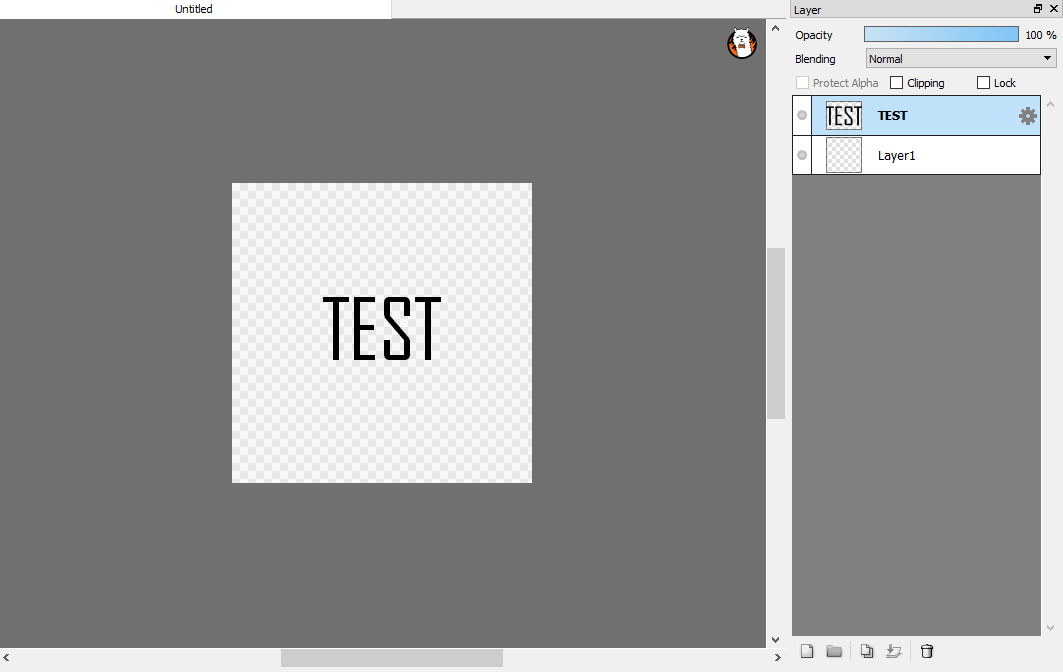
3 - We're going to be doing a simple text animation. Press "T" on your keyboard (or on the tools bar) to access the Text tool. Press somewhere on the image, then type: TEST

For aesthetics reasons, center the words in the middle of the image. This will be the skeleton you use to build your animation. Always make sure you have a skeleton; then you know where things will be going.
004-Add-Text.png

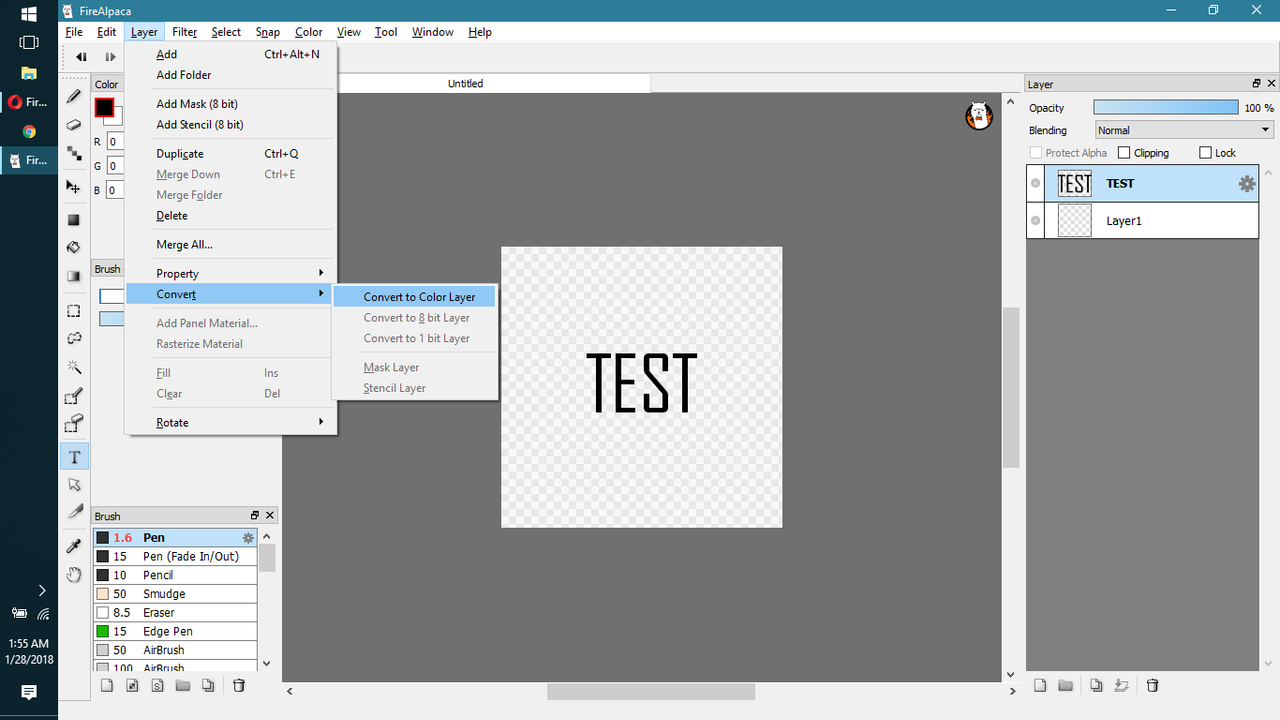
4 - Convert your TEST layer to a Color Layer.
005-Convert.png
5 - Duplicate the layer 3 times until you've got four items that say "TEST". Then rename them (double click) accordingly: "T", "TE", "TES", and "TEST". This will help you keep track of what is exactly on the image. You could also just use numbers, as long as you remember which number represents what. Make sure to keep it consistent.
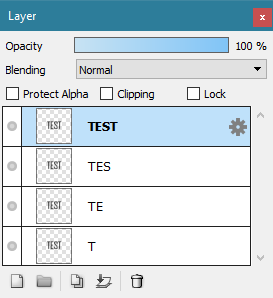
006-Duplicate-Layers.png

6 - Now, except for the bottom most one, hide all the layers. Click the grey circles to hide the layer.
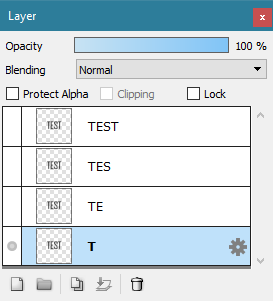
007-Hide-Layers.png

7 - Delete all the letters that are not visible in the letter name. I.e., in layer “T”, make sure what exists on the canvas is only the ""T"".

008-Start-Deleting.png

8 - Do the same for the other layers. Display only the layer you're working on. **ALSO MAKE SURE YOU’RE WORKING ON THE RIGHT LAYER**.
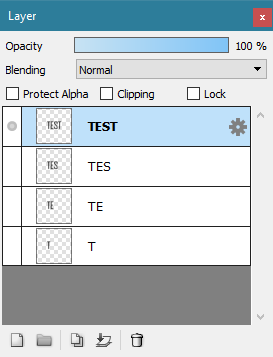
009-Make-Anim.png

9 - Click on "View" - "Onion Skin Mode". Then click on "View" - "Autoplay".
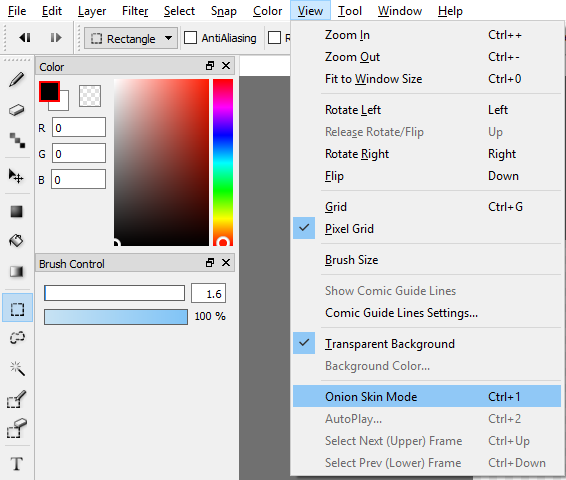
010-Open-Onion-Skin.png
Congratulations! You've made your first animation.

Now, you'll notice that in my screenshots, some of my tools have keyboard shortcuts you might not. Artists (should) rely on keyboard shortcuts to save on time. The less time you spend dawdling and finding tools is more time you can use to work on your art.

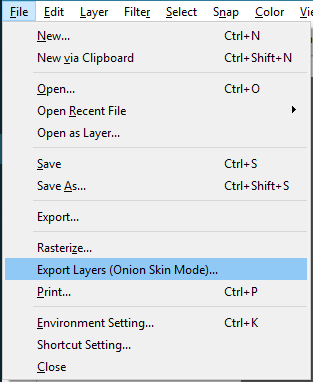
To set a keyboard shortcut, go to File > Shortcut Setting.


Okay. Now you've got an animation. How do you get it onto the web?


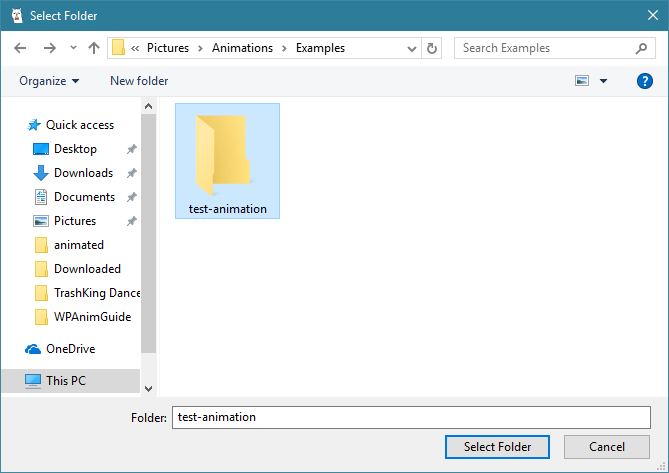
10 - Exit out of Autoplay. Select File > Export Layers (Onion Skin Mode). The Save screen will come up. Make a new folder and name it something memorable, like "test". Click into the folder, then press "Select Folder". When asked to open FireAlpaca Douga, select "Yes".
011-Export-PNG.png
012-Save-PNG.png

11 - Once you're on the website, scroll down a bit and click "Select all files". Navigate to where you saved your animation. Once all your files have been loaded, scroll down a bit more. Adjust framework speed to your desire. You might want to uncheck "Insert FireAlpaca logo" so you don't get that hideous alpaca on your new masterpiece. Then select "Create!" then "Download", then "Download" again.

12 - Name the image something memorable, then save it where you'll easily find it. Once you've saved it, simply upload it to an image host such as PostImages or Imageshack. Share link as necessary.

green-light-dark-page-divider-by-thomashir-dan7y1c.png
If any part was confusing, feel free to let me know and I can clarify for you.
Thanks for reading.

**Most animations are made in similar ways in different graphics programs. You just have to figure out what way works best for you.

page dividers can be found at Thomashir.deviantart.com


Edited at June 10, 2022 02:09 AM by Vennenum
Animating in FireAlpacaJuly 17, 2019 05:15 PM


Former Pack

Neutral
 
Posts:0
#1488935
Give Award
Hello!
I have tried following your guide! While I am sure your guide works I am unable to complete the steps. I have all of my layers set as color layers but for some reason I can not see a layer until I am clicked onto it. This
is when I am clicked onto the layer.
https://i.postimg.cc/yNmmwYCb/Clicked-On.png
then I click off of that layer and it is no longer visible!
https://i.postimg.cc/0jSZyg66/Clicked-Off.png

I have all of the other layers hidden and that layer is the only one made visible so why won't it show up? I there a setting that I may have set that caused this?

Edited at June 10, 2022 02:09 AM by Vennenum
Animating in FireAlpacaJuly 17, 2019 06:55 PM


Vennenum

Darkseeker
 
Posts:5797
#1489146
Give Award
Rufous - if you are in Onion Skin mode, only the activated layer will be displayed. Since everything else is hidden, nothing will show up.

Try turning it off.
Animating in FireAlpacaJuly 17, 2019 06:57 PM


Former Pack

Neutral
 
Posts:0
#1489152
Give Award
Ack. I feel dumb. Thanks so much! Finishing the rest of your guide now!

Edited at June 10, 2022 02:10 AM by Vennenum
Animating in FireAlpacaJuly 17, 2019 07:00 PM


Former Pack

Neutral
 
Posts:0
#1489171
Give Award
Thank you! This helped SO much!
Animating in FireAlpacaJuly 18, 2019 10:45 AM


Former Pack

Neutral
 
Posts:0
#1490077
Give Award
You can do blinking in FireAlapaca! Add another plain layer:

https://i.postimg.cc/mDp4BS73/JHs-HR9-Mp-J7hl-FYT3.gif
Animating in FireAlpacaJuly 19, 2019 10:32 AM


Former Pack

Neutral
 
Posts:0
#1493051
Give Award
I would but I just do different pictures to do a Slideclip
Animating in FireAlpacaJuly 19, 2019 01:26 PM


Vennenum

Darkseeker
 
Posts:5797
#1493537
Give Award
^ Which distorts each image and makes them look even worse.
If you make your animations manually, you have control over how each and every frame looks.
Animating in FireAlpacaJuly 20, 2019 12:58 PM


Former Pack

Neutral
 
Posts:0
#1496279
Give Award
Thanks Venn! This helped me a lot! I've always been wondering how people do this! Thanks again!

Forums > Member Help > Guides
   1 

Refresh