Wolf Play Game

Wolf Play Game
 Spring Month: 3   Day   Sunny
    

Chatbox
 Owlstar
01:17:36 tiger\Owl|she\her
Wait. Wich of my girls should I breed him with??
 Hurry
01:17:30 
._.
 lovrenee
01:17:20 renee
@Asteroid
I don't see why not lol good one
 Hurry
01:17:18 
No problem ^^
 Enthralled Poet
01:16:45 Asteroid, Poet
oh wait can i say that
 Enthralled Poet
01:16:38 Asteroid, Poet
renee
thats what she said
 Owlstar
01:16:21 tiger\Owl|she\her
Ooh ok thanks
 lovrenee
01:16:08 renee
,, looks harder than it is*
 SouthernScorpion
01:16:00 Scorpion
the dominance, the male and female with the highest dom CP are alpha
 lovrenee
01:15:54 renee
@Hurry
perfect!! thank you :) I've been told it looks harder than it looks, just need the patience for it
 Owlstar
01:15:14 tiger\Owl|she\her
Scorpion how do you make a wolf the alpha?
 Hurry
01:14:40 
Just saw W3Schools have a YoutTube channel, so here:
-YT Click-

And I wish you persistence and patience ^^ really, it is not hard, but it takes some practice depending on what you wanna make
 SouthernScorpion
01:14:21 Scorpion
-WP Click- ahhhh considering making this guy an alpha but he has no boost
 Owlstar
01:14:15 tiger\Owl|she\her
Andy she’s really really pretty. I hope she don’t die soon
 lovrenee
01:13:52 renee
@Hurry
looking at it right now, don't have a lot of time to get into it at the moment but I can already tell this is a lot more helpful then other things I have looked at lol
 Andypaws
01:13:03 Andy/Kait [he/they]
-WP Click- getting old :(
 Fernweh.
01:12:37 Fern|Kinz|(her)
Cae
That's awesome <3
I'm doing good! I've just been insanely busy as of recent :') Surviving is probably the kindest word for it lmao
 Owlstar
01:11:57 tiger\Owl|she\her
I think I’m just to lazy to move her…
 Owlstar
01:11:40 tiger\Owl|she\her
No idea why I didn’t already put the pregnant girl in the folder to hide away…she’s just sitting out there…
 Hurry
01:10:08 
@lovrenee
Well, not a video, but site W3Schools for html and css might help? They cover a lot of stuff, so just pick and choose some things that seem useful.

Refresh

You must be a registered member for more
than 1 day before you can use our chatbox.


Quests

Embark on a Quest.

Alliance Battles

Join an Alliance.

Challenges

Hourly Damage Variances
Death Adder : -4
Mamba : +2
Bobcat : +2


WolfPlay Game
Chatbox
 Owlstar
01:17:36 tiger\Owl|she\her
Wait. Wich of my girls should I breed him with??
 Hurry
01:17:30 
._.
 lovrenee
01:17:20 renee
@Asteroid
I don't see why not lol good one
 Hurry
01:17:18 
No problem ^^
 Enthralled Poet
01:16:45 Asteroid, Poet
oh wait can i say that
 Enthralled Poet
01:16:38 Asteroid, Poet
renee
thats what she said
 Owlstar
01:16:21 tiger\Owl|she\her
Ooh ok thanks
 lovrenee
01:16:08 renee
,, looks harder than it is*
 SouthernScorpion
01:16:00 Scorpion
the dominance, the male and female with the highest dom CP are alpha
 lovrenee
01:15:54 renee
@Hurry
perfect!! thank you :) I've been told it looks harder than it looks, just need the patience for it
 Owlstar
01:15:14 tiger\Owl|she\her
Scorpion how do you make a wolf the alpha?
 Hurry
01:14:40 
Just saw W3Schools have a YoutTube channel, so here:
-YT Click-

And I wish you persistence and patience ^^ really, it is not hard, but it takes some practice depending on what you wanna make
 SouthernScorpion
01:14:21 Scorpion
-WP Click- ahhhh considering making this guy an alpha but he has no boost
 Owlstar
01:14:15 tiger\Owl|she\her
Andy she’s really really pretty. I hope she don’t die soon
 lovrenee
01:13:52 renee
@Hurry
looking at it right now, don't have a lot of time to get into it at the moment but I can already tell this is a lot more helpful then other things I have looked at lol
 Andypaws
01:13:03 Andy/Kait [he/they]
-WP Click- getting old :(
 Fernweh.
01:12:37 Fern|Kinz|(her)
Cae
That's awesome <3
I'm doing good! I've just been insanely busy as of recent :') Surviving is probably the kindest word for it lmao
 Owlstar
01:11:57 tiger\Owl|she\her
I think I’m just to lazy to move her…
 Owlstar
01:11:40 tiger\Owl|she\her
No idea why I didn’t already put the pregnant girl in the folder to hide away…she’s just sitting out there…
 Hurry
01:10:08 
@lovrenee
Well, not a video, but site W3Schools for html and css might help? They cover a lot of stuff, so just pick and choose some things that seem useful.


Refresh

You must be a member for more than 1 day before you can chat.

Forums

→ WolfPlay is a fun game! Sign Up Now!


My Subscriptions
My Bookmarks
My Topics
Latest Topics
Following

Forums > Member Help > Guides
   1    2 

Pelt Contest GuideDecember 30, 2024 11:21 PM


Purgatory

Darkseeker
 
Posts:176
#3078629
Give Award

13
Hey fellow WPers, have you ever wanted to enter one of the pelt contests but were unsure of how to go about it? Look no further, here is a short guide!
-+-+-
1st - Download the image of the wolf on the forum page (It has a transparent background, you'll want to preserve that element for later on, so make sure to use png for best results)
2nd - Upload the wolf image to a layer in your art app for the base layer.
3rd - Create a new layer on top and leave this blank for now, it will be where you make your design
4th - Upload the image of the wolf to a third layer on top of both of the others. Set this layer to either overlay, soft light, or multiply - something to blend it so that it preserves WPs natural shading and lines without obscurring your lovely artwork.
-+-+-
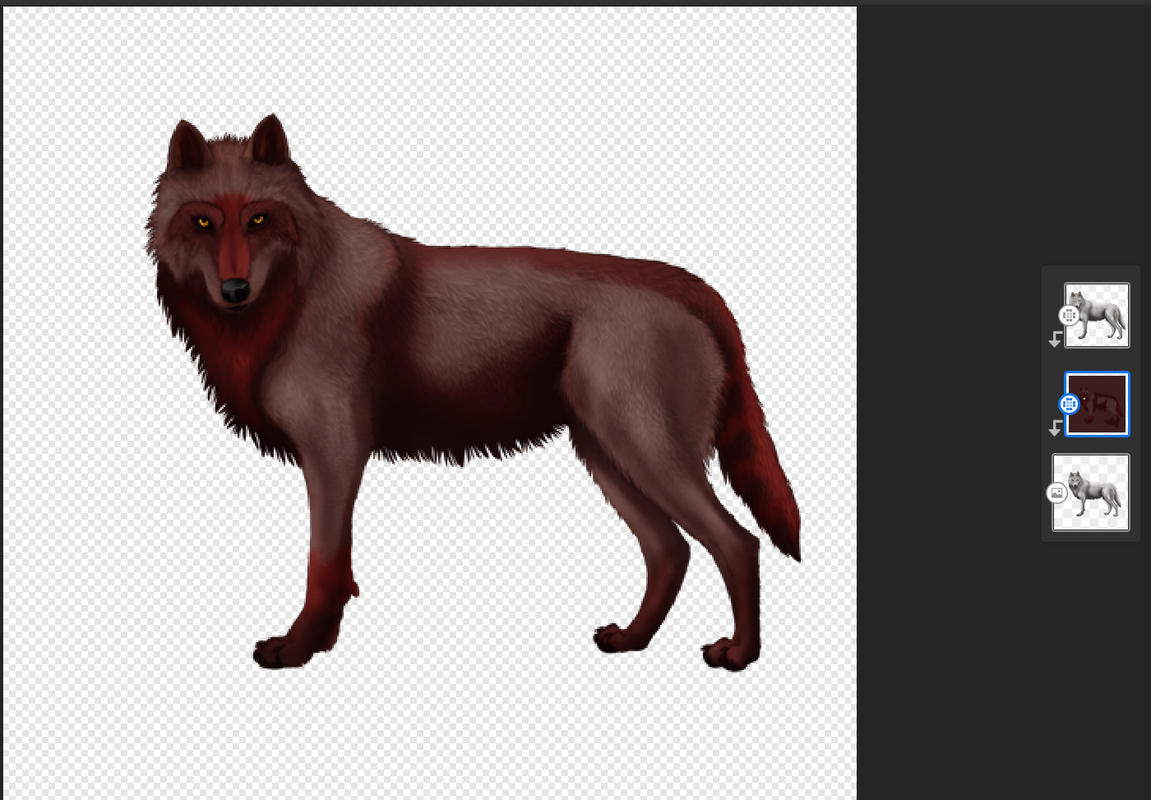
__________ Pelt Displayed: Bloodborn __________
Screenshot-2024-12-30-214611.png
Additional Tips:
Avoid rough color blocks by using a smoothening tool or airbrush
Follow the flow of the fur when making intricate markings, this will aid realism
Snap the top layers of your design to the original base image to avoid color from spilling over from the pelt to the background
Erase the eyes and nose from your design to make them pop against the new colors
Beginner's Software Suggestion:
Adobe Fresco - A free to use, multi-capable art host that can be downloaded on almost any device. You will be able to follow my guide more closely using it. It is also compatible with mouse, pen, and finger painting. There is a built-in tutorial to the app that quickly and easily trains users the basics. Up to 20 free layers and downloadable brush packs for no surcharge.
*This is not a paid advert, I just enjoy the app lol

Edited at January 5, 2025 05:49 PM by Purgatory
Pelt Contest GuideDecember 30, 2024 11:51 PM


SixBears

Administrator
Lightbringer
 
Posts:5048
#3078636
Give Award
Thank you, this should help members a lot.
Pelt Contest GuideDecember 31, 2024 12:09 AM


Alchemist

Darkseeker
 
Posts:278
#3078638
Give Award
I will be using these tips! Thank you so much :D
Pelt Contest GuideDecember 31, 2024 10:26 AM


snake

Darkseeker
 
Posts:3543
#3078679
Give Award
oh cool! Thanks so much :D
Pelt Contest GuideJanuary 1, 2025 01:32 AM


Serpents

Lightbringer
 
Posts:4948
#3078798
Give Award
thanks this helps as I have been asking for so long How others get so nice pelts :D Ill be using this for every pelt now, how do I erase the eyes and nose? as I think I did it wrong I no cant get them back?

Edited at January 1, 2025 02:54 PM by Serpents
Pelt Contest GuideJanuary 1, 2025 03:47 PM


Graywing

Darkseeker
 
Posts:1168
#3078848
Give Award

Serpents said:
thanks this helps as I have been asking for so long How others get so nice pelts :D Ill be using this for every pelt now, how do I erase the eyes and nose? as I think I did it wrong I no cant get them back?


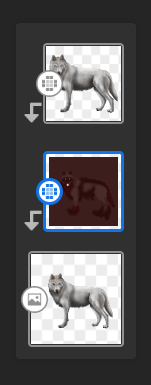
erase the eyes and nose on the color layer, that way the normal eyes and nose will be there
EDIT: 2025-01-01-0qd-Kleki.png
like this

Edited at January 1, 2025 03:50 PM by Graywing
Pelt Contest GuideJanuary 2, 2025 07:32 PM


Serpents

Lightbringer
 
Posts:4948
#3079023
Give Award

Graywing said:

Serpents said:
thanks this helps as I have been asking for so long How others get so nice pelts :D Ill be using this for every pelt now, how do I erase the eyes and nose? as I think I did it wrong I no cant get them back?


erase the eyes and nose on the color layer, that way the normal eyes and nose will be there
EDIT: 2025-01-01-0qd-Kleki.png
like this


ah thanks nother question How do I not get leaks on the color layer?
Pelt Contest GuideJanuary 2, 2025 09:03 PM


Graywing

Darkseeker
 
Posts:1168
#3079037
Give Award

Serpents said:

Graywing said:

Serpents said:
thanks this helps as I have been asking for so long How others get so nice pelts :D Ill be using this for every pelt now, how do I erase the eyes and nose? as I think I did it wrong I no cant get them back?


erase the eyes and nose on the color layer, that way the normal eyes and nose will be there
EDIT: 2025-01-01-0qd-Kleki.png
like this


ah thanks nother question How do I not get leaks on the color layer?


Lower the tolerance level
Pelt Contest GuideJanuary 2, 2025 09:32 PM


Serpents

Lightbringer
 
Posts:4948
#3079040
Give Award

Graywing said:

Serpents said:

Graywing said:

Serpents said:
thanks this helps as I have been asking for so long How others get so nice pelts :D Ill be using this for every pelt now, how do I erase the eyes and nose? as I think I did it wrong I no cant get them back?


erase the eyes and nose on the color layer, that way the normal eyes and nose will be there
EDIT: 2025-01-01-0qd-Kleki.png
like this


ah thanks nother question How do I not get leaks on the color layer?


Lower the tolerance level


so Like the Brush size
Pelt Contest GuideJanuary 2, 2025 11:15 PM


Tartarus

Darkseeker
 
Posts:1751
#3079060
Give Award
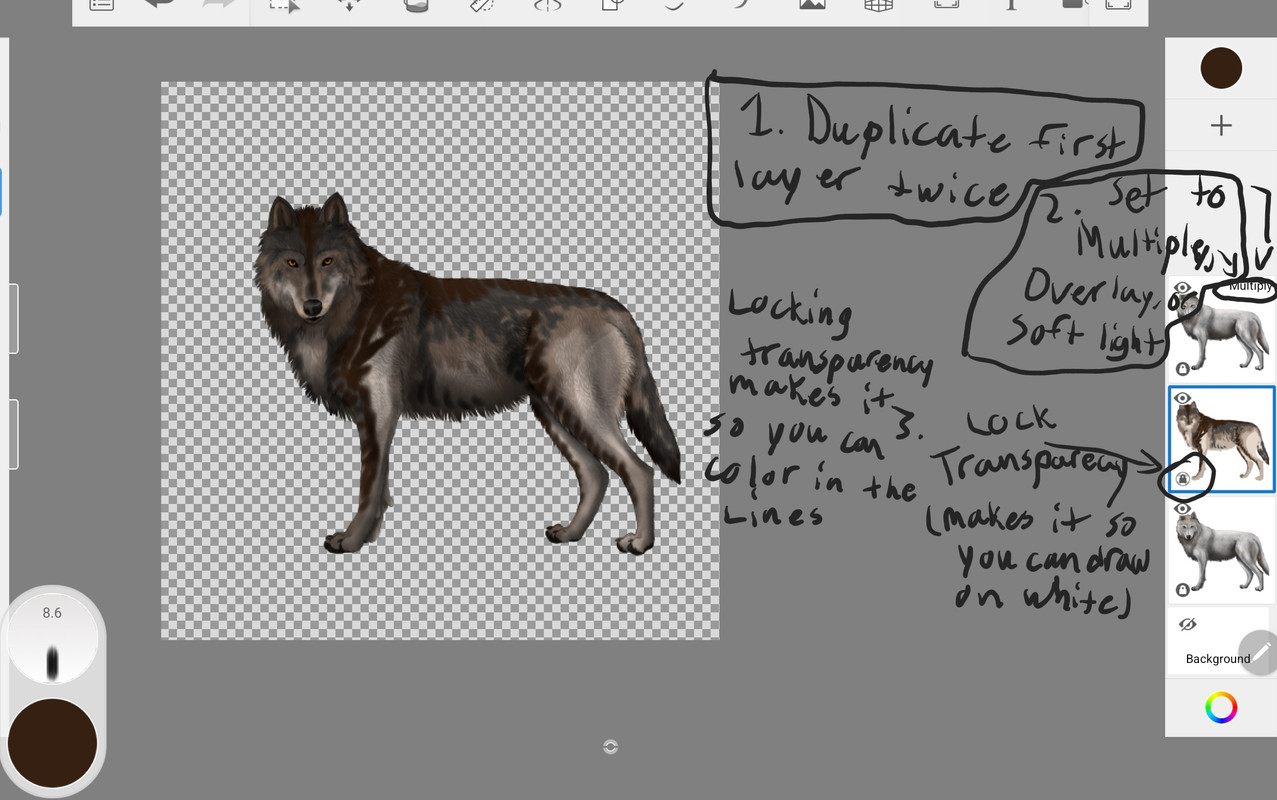
I tried to explain it in this image but I don't know if it would make sense. You can also lock transparency on the top layer which has your blending setting and draw on the top layer. It works just as well. Also, I find using multiply works the best. I can try to help explain further if this doesn't help.

Serpents said:

Graywing said:

Serpents said:

Graywing said:

Serpents said:
thanks this helps as I have been asking for so long How others get so nice pelts :D Ill be using this for every pelt now, how do I erase the eyes and nose? as I think I did it wrong I no cant get them back?


erase the eyes and nose on the color layer, that way the normal eyes and nose will be there
EDIT: 2025-01-01-0qd-Kleki.png
like this


ah thanks nother question How do I not get leaks on the color layer?


Lower the tolerance level


so Like the Brush size


Forums > Member Help > Guides
   1    2 

Refresh