Wolf Play Game

Wolf Play Game
 Spring Month: 1   Night   Clear  Moon: 
      

Chatbox
 SouthernScorpion
10:19:54 Scorpion
I bred a 1k+ talent wolf to a 1k+ talent, boosted, and defected, wolf, and got BUNK. nothing. nada. whole litter useless
 Dagger Pack
10:17:02 Zuko/Legacy
Ash,

Here is the game's guide to it:

How do I buy more wolves? In the game menu, go to Realm > Marketplace > Trading Post. Click the "For Sale" checkbox, and any other option you like. Then click submit. A list of wolves for sale will display. Choose the ones that have good to excellent affinity with your pack.
 Nekros
10:15:34 Kros
Ash,

Go to trading post, scroll down and hit "for sale" and then fill out your preferences (male female, rarity, talent, etc.) then you can scroll all the way down and do price "lowest to highest", and you can get them usually with mush.
 ashfoot
10:14:28 
i dont know i cant find any wolves in the trading post and if i do how do i get them
 Acerbus.
10:12:41 Ace
How is it that I'm so good at saving mush, but the second I get apples I want to spend them all >.>
 Nekros
10:09:14 Kros
Ezra,

Ah, yes, I always forget about the ones you can get from explore
 ashfoot
10:06:30 
also you can call me izzy
 Nekros
10:06:28 Kros
Ash,

You can go into the trading post to buy some more
 Ezranian
10:06:14 ezra, he/him
ash-
also you can get some by killing certain rare creatures in explore
 ashfoot
10:05:53 
i dont have wooolves they all died
 Nekros
10:04:21 Kros
Ash,

When you retire wolves, you get bones
 ashfoot
10:03:46 
I have 0 bones how do you get those
 Nekros
10:01:57 Kros
RP anybody? PM me!
 EvergreenHills
09:59:32 Juicy Arm Boy
‘Only 305’
 BuggyOs
09:59:22 Lucky Ladybug
I only have 305 bones cause I spent a bunch
 Spicy Star
09:58:52 Starlight
Ezra! what the fuck!! xD
 Saint
09:57:40 Is a bee
I have 50 extra den space so I will probably start breeding for bones again so I can stay up top lol
 Ezranian
09:57:04 ezra, he/him
i have, uh, 2349 moon flowers. i Am online too much
 Spicy Star
09:55:47 Starlight
Quit Bragging /silly
 EvergreenHills
09:55:44 Juicy Arm Boy
34 bones
I sell all my bones :>

Refresh

You must be a registered member for more
than 1 day before you can use our chatbox.


Quests

Embark on a Quest.

Alliance Battles

Join an Alliance.

Challenges

Hourly Damage Variances
Crocodile : -1
Coyote : -5
Jackal : +5


WolfPlay Game
Chatbox
 SouthernScorpion
10:19:54 Scorpion
I bred a 1k+ talent wolf to a 1k+ talent, boosted, and defected, wolf, and got BUNK. nothing. nada. whole litter useless
 Dagger Pack
10:17:02 Zuko/Legacy
Ash,

Here is the game's guide to it:

How do I buy more wolves? In the game menu, go to Realm > Marketplace > Trading Post. Click the "For Sale" checkbox, and any other option you like. Then click submit. A list of wolves for sale will display. Choose the ones that have good to excellent affinity with your pack.
 Nekros
10:15:34 Kros
Ash,

Go to trading post, scroll down and hit "for sale" and then fill out your preferences (male female, rarity, talent, etc.) then you can scroll all the way down and do price "lowest to highest", and you can get them usually with mush.
 ashfoot
10:14:28 
i dont know i cant find any wolves in the trading post and if i do how do i get them
 Acerbus.
10:12:41 Ace
How is it that I'm so good at saving mush, but the second I get apples I want to spend them all >.>
 Nekros
10:09:14 Kros
Ezra,

Ah, yes, I always forget about the ones you can get from explore
 ashfoot
10:06:30 
also you can call me izzy
 Nekros
10:06:28 Kros
Ash,

You can go into the trading post to buy some more
 Ezranian
10:06:14 ezra, he/him
ash-
also you can get some by killing certain rare creatures in explore
 ashfoot
10:05:53 
i dont have wooolves they all died
 Nekros
10:04:21 Kros
Ash,

When you retire wolves, you get bones
 ashfoot
10:03:46 
I have 0 bones how do you get those
 Nekros
10:01:57 Kros
RP anybody? PM me!
 EvergreenHills
09:59:32 Juicy Arm Boy
‘Only 305’
 BuggyOs
09:59:22 Lucky Ladybug
I only have 305 bones cause I spent a bunch
 Spicy Star
09:58:52 Starlight
Ezra! what the fuck!! xD
 Saint
09:57:40 Is a bee
I have 50 extra den space so I will probably start breeding for bones again so I can stay up top lol
 Ezranian
09:57:04 ezra, he/him
i have, uh, 2349 moon flowers. i Am online too much
 Spicy Star
09:55:47 Starlight
Quit Bragging /silly
 EvergreenHills
09:55:44 Juicy Arm Boy
34 bones
I sell all my bones :>


Refresh

You must be a member for more than 1 day before you can chat.

Forums

→ WolfPlay is a fun game! Sign Up Now!


My Subscriptions
My Bookmarks
My Topics
Latest Topics
Following

Forums > Member Help > Guides
   1   ..    27    28    29    30    31   ..   47 

Custom Palette CSS stylesAugust 21, 2022 02:27 PM


Devils Heart

Neutral
 
Posts:887
#2799003
Give Award
Heyy, I'm new to making pallets, and was wondering on how to change the cursor to a custom cursor? I've seen a few dens with custom cursors and it's really cool! ^^'
Custom Palette CSS stylesAugust 21, 2022 02:57 PM


Former Pack

Neutral
 
Posts:0
#2799021
Give Award
Stxrmmix, this is what I saw while digging through this thread. I haven't used this coding myself though, so I'm not sure how much this helps you.


Venerixen said:

Also is there a way to code your mouse cursor to be different with your pallette? I think there is as I've seen someone's pallette with a different one.


This would help

* {cursor: url(INSERT CURSOR IMAGE LINK 1),auto;}

a:-webkit-any-link {cursor: url(INSTERT CURSOR IMAGE LINK 2),auto;}

.bsmalltext a:link {cursor: url(INSERT CURSOR IMAGE LINK 3),auto;}
.bsmalltext a:visited {cursor: url(INSERT CURSOR IMAGE LINK 3),auto;}

.iclass {cursor: auto;}

* is for every selector

a:-webkit-any-link is for links but you can specify it more by adding it in specific selectors (eg bsmalltext)

"INSERT CURSOR IMAGE LINK X" is the link of the cursor you want to be displayed in your palette.
Custom Palette CSS stylesAugust 22, 2022 02:30 PM


Devils Heart

Neutral
 
Posts:887
#2799383
Give Award

Okino said:
Stxrmmix, this is what I saw while digging through this thread. I haven't used this coding myself though, so I'm not sure how much this helps you.


Venerixen said:

Also is there a way to code your mouse cursor to be different with your pallette? I think there is as I've seen someone's pallette with a different one.


This would help

* {cursor: url(INSERT CURSOR IMAGE LINK 1),auto;}

a:-webkit-any-link {cursor: url(INSTERT CURSOR IMAGE LINK 2),auto;}

.bsmalltext a:link {cursor: url(INSERT CURSOR IMAGE LINK 3),auto;}
.bsmalltext a:visited {cursor: url(INSERT CURSOR IMAGE LINK 3),auto;}

.iclass {cursor: auto;}

* is for every selector

a:-webkit-any-link is for links but you can specify it more by adding it in specific selectors (eg bsmalltext)

"INSERT CURSOR IMAGE LINK X" is the link of the cursor you want to be displayed in your palette.


Thank you! :D
Custom Palette CSS stylesAugust 22, 2022 04:10 PM


Devils Heart

Neutral
 
Posts:887
#2799400
Give Award
Heyy, I just finished making my s/o's pallet, and I sort of messed up on the text, making it pure black instead of dark orange or red, is there anyway to fix that? >.<
Custom Palette CSS stylesAugust 22, 2022 09:17 PM


Vennenum

Darkseeker
 
Posts:5797
#2799479
Give Award
You're gonna have to re-read your entire palette and see what text got changed. Otherwise, if you shoot me your code and what text color you're trying to change, I might be able to diagnose it.
Custom Palette CSS stylesAugust 23, 2022 12:01 PM


Devils Heart

Neutral
 
Posts:887
#2799715
Give Award
Venn - ;>
Alright, thank you I'll try and figure it out and if I'm unable too, I'll send it over ^^'
Update: Eno managed to fix the pallet. :)

Edited at August 23, 2022 05:44 PM by Stxrmmix <3
Custom Palette CSS stylesSeptember 2, 2022 04:37 PM


los campesinos!

Neutral
 
Posts:2418
#2803105
Give Award
for anyone who doesn't like the new buttons and wants them back how they were before, here's code that will do that:

.wpbutton { font-family:arial,sans-serif; font-size:15px; color:#000000; background-color:rgba(0,0,0,0); padding:0px; border:0px; border-radius:0px; border: 0px solid #000000; }
.wpbutton a:visited { font-family:arial,sans-serif; font-size:15px; color:#000000; background-color:rgba(0,0,0,0); padding:0px; }
.wpbutton a:link { font-family:arial,sans-serif; font-size:15px; color:#000000; background-color:rgba(0,0,0,0); padding:0px; }
.wpbutton a:hover { font-family:arial,sans-serif; font-size:15px; color:#000000; background-color:rgba(0,0,0,0); padding:0px; }

just edit the text colours to how yours are

Custom Palette CSS stylesSeptember 2, 2022 05:38 PM


Eno

Darkseeker
 
Posts:558
#2803137
Give Award
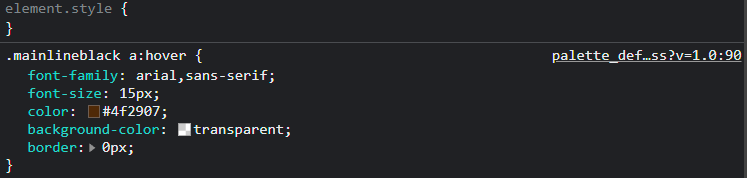
has anyone else figured out which code it is for the hover on the sales history link? I thought it was the .wpbutton a:hover but that doesn't seem to work :/
Custom Palette CSS stylesSeptember 4, 2022 10:12 AM


Vennenum

Darkseeker
 
Posts:5797
#2803688
Give Award
Eno - I took a quick look as I currently dont have time to be editing palettes. It seems weird, but this seems to work:
screenshot-33.png
Custom Palette CSS stylesSeptember 4, 2022 05:49 PM


Eno

Darkseeker
 
Posts:558
#2803817
Give Award
Vennenum said:
Eno - I took a quick look as I currently dont have time to be editing palettes. It seems weird, but this seems to work:
screenshot-33.png
Oooh yes, I forgot to add that. Thanks a bunch ^^

Forums > Member Help > Guides
   1   ..    27    28    29    30    31   ..   47 

Refresh