Wolf Play Game

Wolf Play Game
 Winter Month: 3   Night   Clear  Moon: 
      

Chatbox
 The Rat Lord
10:10:38 Rat/spooky/(he/him)
Ok rattie is off for a bit, be back soon <3
 The Rat Lord
10:08:56 Rat/spooky/(he/him)
For next time
 The Rat Lord
10:08:23 Rat/spooky/(he/him)
Dawn
Trading post> Detailed wolf search> scroll down> Click for Breeding> pick gender> then price> then hit submit
 Dawn
10:07:12 
Oh ok thx

 Ezranian
10:07:02 ezra, he/him
females can only be bred once a game year
 Dawn
10:06:32 
Ohhh wait but my wolf is not pregnant so why can’t I breed?
 Ezranian
10:06:10 ezra, he/him
dawn-
if you mean you can't find the button on a wolf's page, that's because you don't have any breedable females at the moment
 Owlstar
10:05:24 tiger\Owl|she\her
dawn I would help but I'm not the best at explaining. and you could always go to sales chat too
 The Rat Lord
10:05:10 Rat/spooky/(he/him)
Dawn
You do breed then go all the way down and click submit (you can also pick your gender you want to mate with)
 Dawn
10:03:15 
I can’t find out where to breed other wolves in the trading post like it says the wolf is for breeding but I cannot find the button
 Owlstar
09:58:45 tiger\Owl|she\her
ok :3
 Ámor
09:58:17 Slowly coming back
@Owl
Neither of the pregnancies were really planned, but we always talked about having 2 kids at least, im gonna try to 100% confirm it before really telling people at my work. I may bring it up to my one manager whose my friend if he works tomorrow
 ChatNoir
09:57:11 Chat, Noir, Venti
Life happens.
 Owlstar
09:56:54 tiger\Owl|she\her
oh dear god. hope your ok. babys are definitaly not my preferred companion lol
 Ámor
09:56:39 Slowly coming back
Guts*
 Ámor
09:56:33 Slowly coming back
@Noctem
Thanks, im also a little nervous cause I just got back from
Maternity leave in feb... my works gonna hate my guys LOL
 Carpe Noctem
09:55:43 Carpal Tunnel
Congrats! ^^
 Ámor
09:54:59 Slowly coming back
@Owl
Good, a little nervous as I currently have a 4 month old lol
 Owlstar
09:54:20 tiger\Owl|she\her
amor...good or bad..
 ChatNoir
09:53:49 Chat, Noir, Venti
Holy Barbatos. Is a congrats in order?

Refresh

You must be a registered member for more
than 1 day before you can use our chatbox.


Quests

Embark on a Quest.

Alliance Battles

Join an Alliance.

Challenges

Hourly Damage Variances
Wolverine : -4
Brown Bear : +1
Marten : +2


WolfPlay Game
Chatbox
 The Rat Lord
10:10:38 Rat/spooky/(he/him)
Ok rattie is off for a bit, be back soon <3
 The Rat Lord
10:08:56 Rat/spooky/(he/him)
For next time
 The Rat Lord
10:08:23 Rat/spooky/(he/him)
Dawn
Trading post> Detailed wolf search> scroll down> Click for Breeding> pick gender> then price> then hit submit
 Dawn
10:07:12 
Oh ok thx

 Ezranian
10:07:02 ezra, he/him
females can only be bred once a game year
 Dawn
10:06:32 
Ohhh wait but my wolf is not pregnant so why can’t I breed?
 Ezranian
10:06:10 ezra, he/him
dawn-
if you mean you can't find the button on a wolf's page, that's because you don't have any breedable females at the moment
 Owlstar
10:05:24 tiger\Owl|she\her
dawn I would help but I'm not the best at explaining. and you could always go to sales chat too
 The Rat Lord
10:05:10 Rat/spooky/(he/him)
Dawn
You do breed then go all the way down and click submit (you can also pick your gender you want to mate with)
 Dawn
10:03:15 
I can’t find out where to breed other wolves in the trading post like it says the wolf is for breeding but I cannot find the button
 Owlstar
09:58:45 tiger\Owl|she\her
ok :3
 Ámor
09:58:17 Slowly coming back
@Owl
Neither of the pregnancies were really planned, but we always talked about having 2 kids at least, im gonna try to 100% confirm it before really telling people at my work. I may bring it up to my one manager whose my friend if he works tomorrow
 ChatNoir
09:57:11 Chat, Noir, Venti
Life happens.
 Owlstar
09:56:54 tiger\Owl|she\her
oh dear god. hope your ok. babys are definitaly not my preferred companion lol
 Ámor
09:56:39 Slowly coming back
Guts*
 Ámor
09:56:33 Slowly coming back
@Noctem
Thanks, im also a little nervous cause I just got back from
Maternity leave in feb... my works gonna hate my guys LOL
 Carpe Noctem
09:55:43 Carpal Tunnel
Congrats! ^^
 Ámor
09:54:59 Slowly coming back
@Owl
Good, a little nervous as I currently have a 4 month old lol
 Owlstar
09:54:20 tiger\Owl|she\her
amor...good or bad..
 ChatNoir
09:53:49 Chat, Noir, Venti
Holy Barbatos. Is a congrats in order?


Refresh

You must be a member for more than 1 day before you can chat.

Forums

→ WolfPlay is a fun game! Sign Up Now!


My Subscriptions
My Bookmarks
My Topics
Latest Topics
Following

Forums > Member Help > Guides
   1   ..    26    27    28    29    30   ..   47 

Custom Palette CSS stylesMay 18, 2022 02:56 AM


British Empire

Neutral
 
Posts:324
#2766658
Give Award

How do I change the white denpage tables? (Pack Bio, Familiars, Pack Stats ect.) And also basically every other table. xD

Secondly, how do I remove the border that outlines all site contents? Or at least edit it to be tranparent.

Edited at May 18, 2022 02:29 PM by British Empire
Custom Palette CSS stylesMay 18, 2022 07:50 PM


Eno

Darkseeker
 
Posts:558
#2766901
Give Award
British Empire said:

How do I change the white denpage tables? (Pack Bio, Familiars, Pack Stats ect.) And also basically every other table. xD

Secondly, how do I remove the border that outlines all site contents? Or at least edit it to be tranparent.
table div:nth-child(1) {background-color: #HEX;} will change the white tables, but it also causes a few code breaks in the palette.

as for the banner and page borders just put border: none; in your code like

.mainscreen1 {background: transparent; border: none;}

.pgbg {background-color: #color; border: none;}

Edited at May 18, 2022 07:50 PM by Eno
Custom Palette CSS stylesMay 18, 2022 08:08 PM


British Empire

Neutral
 
Posts:324
#2766904
Give Award

Eno said:
British Empire said:

How do I change the white denpage tables? (Pack Bio, Familiars, Pack Stats ect.) And also basically every other table. xD

Secondly, how do I remove the border that outlines all site contents? Or at least edit it to be tranparent.
table div:nth-child(1) {background-color: #HEX;} will change the white tables, but it also causes a few code breaks in the palette.

as for the banner and page borders just put border: none; in your code like

.mainscreen1 {background: transparent; border: none;}

.pgbg {background-color: #color; border: none;}


Thank you! <33
Custom Palette CSS stylesJune 20, 2022 02:22 AM


Vennenum

Darkseeker
 
Posts:5797
#2779484
Give Award
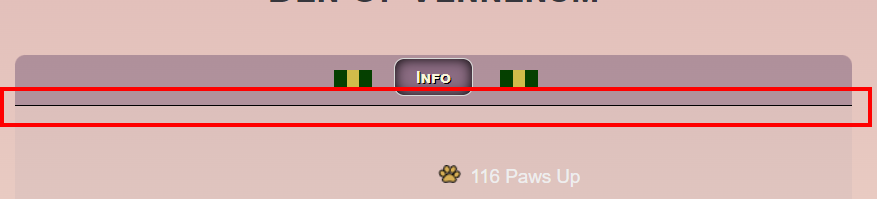
Question to all those more proficient at this than I am:
Is there a way to get rid of this border?
screenshot-10.png
Custom Palette CSS stylesJune 20, 2022 04:02 PM


Former Pack

Neutral
 
Posts:0
#2779690
Give Award
adding border:0px!important; under .mainlineblack div.primary should get rid of it

Vennenum said:
Question to all those more proficient at this than I am:
Is there a way to get rid of this border?
screenshot-10.png


Custom Palette CSS stylesJune 20, 2022 09:35 PM


Vennenum

Darkseeker
 
Posts:5797
#2779798
Give Award
Such a simple solution.
It worked, thanks!
Custom Palette CSS stylesJuly 9, 2022 12:35 AM


Flaming Rose

Neutral
 
Posts:53
#2785465
Give Award
how do i make the white box that has my pack info on the den page transparent? like under where it says info, how do i make that box transparent?
Custom Palette CSS stylesJuly 14, 2022 12:37 PM


Vennenum

Darkseeker
 
Posts:5797
#2787069
Give Award
Eno posted the solution a few posts above yours.
However, I don't recommend fiddling with this until you've gotten the hang of CSS.

Crowe said:
how do i make the white box that has my pack info on the den page transparent? like under where it says info, how do i make that box transparent?


Edited at July 14, 2022 12:40 PM by Vennenum
Custom Palette CSS stylesJuly 28, 2022 06:48 PM


Kháos

Forum Moderator
Lightbringer
 
Posts:4363
#2792084
Give Award
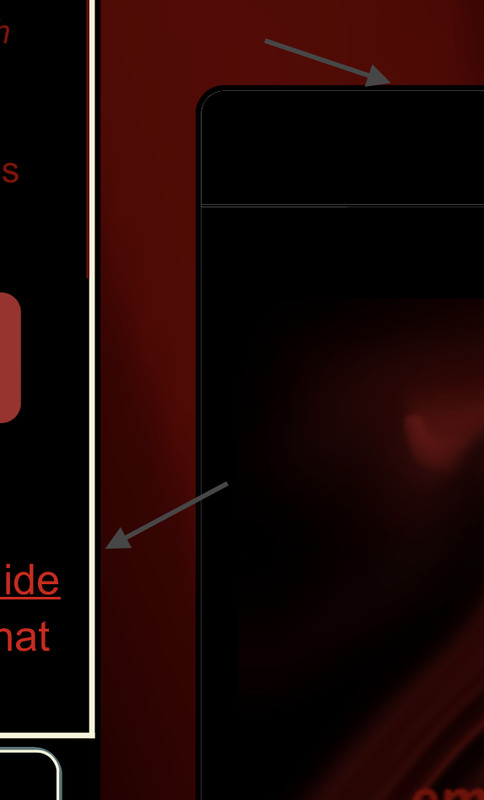
I went through the entire Custom Palette CSS styles topic, and found nothing on this. Please forgive me if it was already asked.

How do I change these borders?

Custom Palette CSS stylesAugust 20, 2022 11:29 PM


Pandemonium

Darkseeker
 
Posts:479
#2798912
Give Award

I have a gap between my navbar box and drop down menu. I can't use my drop down menu because it disappears when I move the cursor to the circled area. I'm not sure how to fix this without deleting everything and starting again. Is it because its hidden behind the weather/mush/apple bar?

https://postimg.cc/gallery/nBhcJkK


Forums > Member Help > Guides
   1   ..    26    27    28    29    30   ..   47 

Refresh