Wolf Play Game

Wolf Play Game
 Fall Month: 3   Day   Heavy Rain
    

Chatbox
 SpiritGuardian
03:55:42 Call me your cowboy
the one night im online chats just not existent lmao
 Sabbath
03:49:09 Rook
this wolf needs like 100 more BE but I can't decide if I want to keep exploring >.<
 Hurry
03:46:11 
that is quite nice ^^ enjoy your time there
 Savik
03:33:12 Nalavara
WOW!
 Bambiix
03:31:28 
Guys my plane just landed in PARIS!!
 Savik
02:53:21 Nalavara
Click on Realm, then Marketplace. You will see the Full Moon Celebration Shop. The moon flowers are the *money* for purchasing the goods in the FMC shop.
 Winterfell
02:48:43 Winter
Renne
Menu > marketplace > full moon celebration shop
 Winterfell
02:47:45 Winter
Renne
Moon towers are little items you can spend in the fmc shop you can buy many things with them . You can get them from howling wrestling exploring ect
 Savik
02:47:32 Nalavara
YAY!!!!!
 Ghoulish
02:46:23 
I found the damnn thing!
 Savik
02:38:29 Nalavara
When the mods come online they can help you.
 lovrenee
02:38:26 renee
What are moon flowers and what do I do with them?
 Savik
02:35:10 Nalavara
I had problems with a single square that was not where the map said it was. It took me over a half hour to find that single square.
 Ghoulish
02:31:34 
Guys how do I change my pack picture
 Ghoulish
02:15:39 
I can’t get to it because of the stupid lines up have to stay on
 Ghoulish
02:15:13 
I do but it’s no helpppp
 Savik
02:14:36 Nalavara
Do you have an explorer's map?
 moonlight_luminary
02:09:47 Lumi/Moon/Moony
I just sent a score in slither... ;-; it's literally zero–
 Ghoulish
01:45:52 
I can’t find this dang last eme,y on Level 3 of the forest
 Moonfall
01:00:16 Many moons, one me
I'm going to go make a cocoon and burrow now. I am currently able to feel my skin

Refresh

You must be a registered member for more
than 1 day before you can use our chatbox.


Quests

Embark on a Quest.

Alliance Battles

Join an Alliance.

Challenges

Hourly Damage Variances
Baboon : +4
Cougar : -1
Wolverine : 0


WolfPlay Game
Chatbox
 SpiritGuardian
03:55:42 Call me your cowboy
the one night im online chats just not existent lmao
 Sabbath
03:49:09 Rook
this wolf needs like 100 more BE but I can't decide if I want to keep exploring >.<
 Hurry
03:46:11 
that is quite nice ^^ enjoy your time there
 Savik
03:33:12 Nalavara
WOW!
 Bambiix
03:31:28 
Guys my plane just landed in PARIS!!
 Savik
02:53:21 Nalavara
Click on Realm, then Marketplace. You will see the Full Moon Celebration Shop. The moon flowers are the *money* for purchasing the goods in the FMC shop.
 Winterfell
02:48:43 Winter
Renne
Menu > marketplace > full moon celebration shop
 Winterfell
02:47:45 Winter
Renne
Moon towers are little items you can spend in the fmc shop you can buy many things with them . You can get them from howling wrestling exploring ect
 Savik
02:47:32 Nalavara
YAY!!!!!
 Ghoulish
02:46:23 
I found the damnn thing!
 Savik
02:38:29 Nalavara
When the mods come online they can help you.
 lovrenee
02:38:26 renee
What are moon flowers and what do I do with them?
 Savik
02:35:10 Nalavara
I had problems with a single square that was not where the map said it was. It took me over a half hour to find that single square.
 Ghoulish
02:31:34 
Guys how do I change my pack picture
 Ghoulish
02:15:39 
I can’t get to it because of the stupid lines up have to stay on
 Ghoulish
02:15:13 
I do but it’s no helpppp
 Savik
02:14:36 Nalavara
Do you have an explorer's map?
 moonlight_luminary
02:09:47 Lumi/Moon/Moony
I just sent a score in slither... ;-; it's literally zero–
 Ghoulish
01:45:52 
I can’t find this dang last eme,y on Level 3 of the forest
 Moonfall
01:00:16 Many moons, one me
I'm going to go make a cocoon and burrow now. I am currently able to feel my skin


Refresh

You must be a member for more than 1 day before you can chat.

Forums

→ WolfPlay is a fun game! Sign Up Now!


My Subscriptions
My Bookmarks
My Topics
Latest Topics
Following

Forums > Member Help > Guides
   1   ..    33    34    35    36    37   ..   47 

Custom Palette CSS stylesNovember 3, 2023 07:20 PM


Sam D

Neutral
 
Posts:123
#2948079
Give Award
I don't know about the forum border but for the buttons use this. Each button is a different color (RBG) so you know which one is which.

Also for mine I don't know why but it brakes my pallet if it is at the bottom but it doesn't brake it if it is at the top of the pallet coding. Just in case it brakes your pallet.

.wpbutton a:link { font-family:arial,sans-serif; font-size:15px; color:#dac972; background-color: #0000ff;
padding:2px; text-decoration: none; }
.wpbutton a:visited {font-family:arial,sans-serif;font-size:15px;color:#000000;background-color: #ff0000;
padding:2px;text-decoration: none;}
.wpbutton {font-family:arial,sans-serif;font-size:15px;color:#000000;background-color: #00ff00; padding:2px;-webkit-border-radius:5px;border-radius:5px;border: 1px solid #000000;text-decoration: none;}

limbo said:
Sorry to be a bother, but does anyone know how to change these?
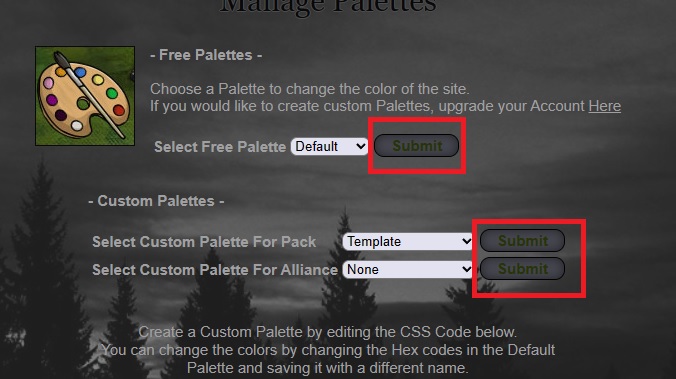
button-text.jpg
(Change the colour of the text in the buttons for Post/Submit/Paws Up/etc.)
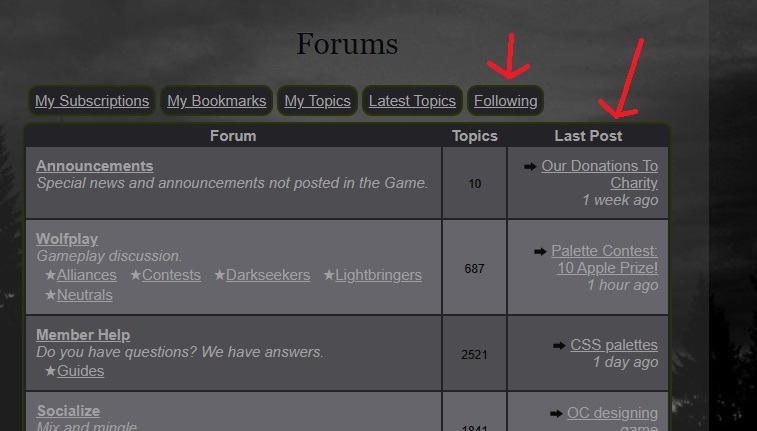
these-borders-mspaint-arrows.jpg
(Change the colour of/remove the forum borders)


Edited at November 3, 2023 11:19 PM by Sam D
Custom Palette CSS stylesNovember 4, 2023 12:01 AM


quagyu

Neutral
 
Posts:2644
#2948123
Give Award
Ack >-< Well, I've struggled with this for a bit.
Can I get more help with changing the page background to be transparent? I'm using this-

.pgbg {
background-color: rgba(0, 0, 0, 0);
}

Edited at November 4, 2023 12:02 AM by Qyusen
Custom Palette CSS stylesNovember 4, 2023 01:35 AM


Sam D

Neutral
 
Posts:123
#2948133
Give Award
Are you talking about this (The pink Background)?

If so, use this image/ code

.pgbg {
background:url(i.postimg.cc/4NGnyxrs/Clear-BG.png);
}

Let me know if it works for you. I tested it on mine before I made this reply and it worked for me.


Qyusen said:
Ack >-< Well, I've struggled with this for a bit.
Can I get more help with changing the page background to be transparent? I'm using this-

.pgbg {
background-color: rgba(0, 0, 0, 0);
}


Edited at November 4, 2023 01:39 AM by Sam D
Custom Palette CSS stylesNovember 4, 2023 02:09 PM


quagyu

Neutral
 
Posts:2644
#2948219
Give Award
Doesn't work, unfortunately, but thanks. Might be something else then if yours works, I'll check again.
Custom Palette CSS stylesNovember 4, 2023 02:43 PM


limbo

Neutral
 
Posts:341
#2948223
Give Award
Sam D said:
I don't know about the forum border but for the buttons use this. Each button is a different color (RBG) so you know which one is which.
Also for mine I don't know why but it brakes my pallet if it is at the bottom but it doesn't brake it if it is at the top of the pallet coding. Just in case it brakes your pallet.
.wpbutton a:link { font-family:arial,sans-serif; font-size:15px; color:#dac972; background-color: #0000ff;
padding:2px; text-decoration: none; }
.wpbutton a:visited {font-family:arial,sans-serif;font-size:15px;color:#000000;background-color: #ff0000;
padding:2px;text-decoration: none;}
.wpbutton {font-family:arial,sans-serif;font-size:15px;color:#000000;background-color: #00ff00; padding:2px;-webkit-border-radius:5px;border-radius:5px;border: 1px solid #000000;text-decoration: none;}
Thank you, however I already have this code in my palette; it changes some of the buttons, but not the specific buttons (circled in my screenshot) that I would like to edit. Is this a mistake on my part?

Qyusen said:
Ack >-< Well, I've struggled with this for a bit.
Can I get more help with changing the page background to be transparent? I'm using this-

.pgbg {
background-color: rgba(0, 0, 0, 0);
}
This is what I've used for my current palette. It uses rgb instead of rgba, not that there's much of a difference. Not saying it'd fix it, but it's something to try if you haven't already (?)

.pgbg {
background-color:rgb(76,76,76,0.4);
}

*Change the 0.4 to 0 for total transparency
Custom Palette CSS stylesNovember 15, 2023 04:41 AM


Sam D

Neutral
 
Posts:123
#2951956
Give Award
How do you change the white Background on your profile? I see other players have theirs changed, but I cant figure it out.
Custom Palette CSS stylesNovember 15, 2023 01:00 PM


Vennenum

Darkseeker
 
Posts:5797
#2952022
Give Award
Can you pm me your code? I can look again when i get home tonight.

Qyusen said:
Doesn't work, unfortunately, but thanks. Might be something else then if yours works, I'll check again.
The code is posted somewhere on this board, you'll have to do a little digging.

Sam D said:
How do you change the white Background on your profile? I see other players have theirs changed, but I cant figure it out.


Custom Palette CSS stylesNovember 15, 2023 06:53 PM


SpiritGuardian

Darkseeker
 
Posts:1417
#2952169
Give Award
>->'
The little section above the about pack and the pack info-
what code is it?
Custom Palette CSS stylesNovember 16, 2023 03:53 AM


Sam D

Neutral
 
Posts:123
#2952270
Give Award
I hope this is it :)

.primary {
background-color: #ff0000;
}


spirit of Christmas said:
>->'
The little section above the about pack and the pack info-
what code is it?


Sam D said:
How do you change the white Background on your profile? I see other players have theirs changed, but I cant figure it out.


For anyone else that needs the code for the den page info (where your info is)
table div:nth-child(1) {
background: rgba(1, 1, 1, 1);
}
Custom Palette CSS stylesDecember 12, 2023 02:46 PM


Wyrmwood

Neutral
 
Posts:49
#2961322
Give Award
i wanted to ask, how do you change the colour of those brown lines on your wolf page and how do you change the colour on 'event and games' once you hover over it?


image.png
image.png

Edited at December 15, 2023 01:28 PM by Wyrmwood

Forums > Member Help > Guides
   1   ..    33    34    35    36    37   ..   47 

Refresh