Wolf Play Game

Wolf Play Game
 Winter Month: 1   Night   Clear  Moon: 
      

Chatbox
 Pink kitty🐈
12:16:09 Kneecap stealer
Why are our wolves torturing us
 Pink kitty🐈
12:15:51 Kneecap stealer
Same goulish
 Pink kitty🐈
12:15:22 Kneecap stealer
-WP Click-

You better go into labor before I go to bed
 Ghoulish
12:13:56 
Gawd Daym my momma wolf is holding da pups in with her life normally my wolves only go to 80-85 hours 😭✌️
 Savik
11:55:42 Nalavara
You are awesome, Eve! <3 Thank you so much!
 Siku of Kinapak
11:55:40 Siku
thanks Eve!
 SixBears
11:54:33 evebot
Thanks guys for sharing. I will think on these bugs and try to get them fixed asap.
 SixBears
11:53:58 evebot
Savik, there was a bug a few weeks ago that caused problem in explore. You probably need to restart your level.
 Savik
11:53:20 Nalavara
Forest Level 154
 Savik
11:53:08 Nalavara
A few weeks ago
 SixBears
11:52:29 evebot
Savik when was the last time you leveled up or restarted the forest?
 Siku of Kinapak
11:50:32 Siku
probably closer to one week
 Savik
11:50:29 Nalavara
I posted the message I got as soon as I saw it. I also cannot move now.
 Siku of Kinapak
11:49:28 Siku
Not the exact date, but it's been maybe one to two weeks now.
 Savik
11:49:20 Nalavara
I have no prey after 102 squares. Anyone else having problems?
 SixBears
11:48:12 evebot
Do you remember about when this started happening?
 Savik
11:47:59 Nalavara
I am exploring in the forest. Just got this message: Fatal error: Call to a member function query() on a non-object in /home/wolfplay/public_html/amaze.php on line 118
 SixBears
11:45:38 evebot
Well, you're on an ipad so I guess it will show desktop view no matter what.
 Siku of Kinapak
11:44:08 Siku
I just tried turning off "set desktop view" but no matter which position it is in, my device continues to show desktop view. it says (for mobile devices). Is there another way I am supposed to do it?
 SixBears
11:40:57 evebot
Can you try it without desktop view and see if you have the same problem?

Refresh

You must be a registered member for more
than 1 day before you can use our chatbox.


Quests

Embark on a Quest.

Alliance Battles

Join an Alliance.

Challenges

Hourly Damage Variances
Red Fox : -5
Black Bear : -2
Cougar : -5


WolfPlay Game
Chatbox
 Pink kitty🐈
12:16:09 Kneecap stealer
Why are our wolves torturing us
 Pink kitty🐈
12:15:51 Kneecap stealer
Same goulish
 Pink kitty🐈
12:15:22 Kneecap stealer
-WP Click-

You better go into labor before I go to bed
 Ghoulish
12:13:56 
Gawd Daym my momma wolf is holding da pups in with her life normally my wolves only go to 80-85 hours 😭✌️
 Savik
11:55:42 Nalavara
You are awesome, Eve! <3 Thank you so much!
 Siku of Kinapak
11:55:40 Siku
thanks Eve!
 SixBears
11:54:33 evebot
Thanks guys for sharing. I will think on these bugs and try to get them fixed asap.
 SixBears
11:53:58 evebot
Savik, there was a bug a few weeks ago that caused problem in explore. You probably need to restart your level.
 Savik
11:53:20 Nalavara
Forest Level 154
 Savik
11:53:08 Nalavara
A few weeks ago
 SixBears
11:52:29 evebot
Savik when was the last time you leveled up or restarted the forest?
 Siku of Kinapak
11:50:32 Siku
probably closer to one week
 Savik
11:50:29 Nalavara
I posted the message I got as soon as I saw it. I also cannot move now.
 Siku of Kinapak
11:49:28 Siku
Not the exact date, but it's been maybe one to two weeks now.
 Savik
11:49:20 Nalavara
I have no prey after 102 squares. Anyone else having problems?
 SixBears
11:48:12 evebot
Do you remember about when this started happening?
 Savik
11:47:59 Nalavara
I am exploring in the forest. Just got this message: Fatal error: Call to a member function query() on a non-object in /home/wolfplay/public_html/amaze.php on line 118
 SixBears
11:45:38 evebot
Well, you're on an ipad so I guess it will show desktop view no matter what.
 Siku of Kinapak
11:44:08 Siku
I just tried turning off "set desktop view" but no matter which position it is in, my device continues to show desktop view. it says (for mobile devices). Is there another way I am supposed to do it?
 SixBears
11:40:57 evebot
Can you try it without desktop view and see if you have the same problem?


Refresh

You must be a member for more than 1 day before you can chat.

Forums

→ WolfPlay is a fun game! Sign Up Now!


My Subscriptions
My Bookmarks
My Topics
Latest Topics
Following

Forums > Member Help > Guides
   1   ..    27    28    29    30    31   ..   47 

Custom Palette CSS stylesAugust 21, 2022 02:27 PM


Devils Heart

Neutral
 
Posts:887
#2799003
Give Award
Heyy, I'm new to making pallets, and was wondering on how to change the cursor to a custom cursor? I've seen a few dens with custom cursors and it's really cool! ^^'
Custom Palette CSS stylesAugust 21, 2022 02:57 PM


Former Pack

Neutral
 
Posts:0
#2799021
Give Award
Stxrmmix, this is what I saw while digging through this thread. I haven't used this coding myself though, so I'm not sure how much this helps you.


Venerixen said:

Also is there a way to code your mouse cursor to be different with your pallette? I think there is as I've seen someone's pallette with a different one.


This would help

* {cursor: url(INSERT CURSOR IMAGE LINK 1),auto;}

a:-webkit-any-link {cursor: url(INSTERT CURSOR IMAGE LINK 2),auto;}

.bsmalltext a:link {cursor: url(INSERT CURSOR IMAGE LINK 3),auto;}
.bsmalltext a:visited {cursor: url(INSERT CURSOR IMAGE LINK 3),auto;}

.iclass {cursor: auto;}

* is for every selector

a:-webkit-any-link is for links but you can specify it more by adding it in specific selectors (eg bsmalltext)

"INSERT CURSOR IMAGE LINK X" is the link of the cursor you want to be displayed in your palette.
Custom Palette CSS stylesAugust 22, 2022 02:30 PM


Devils Heart

Neutral
 
Posts:887
#2799383
Give Award

Okino said:
Stxrmmix, this is what I saw while digging through this thread. I haven't used this coding myself though, so I'm not sure how much this helps you.


Venerixen said:

Also is there a way to code your mouse cursor to be different with your pallette? I think there is as I've seen someone's pallette with a different one.


This would help

* {cursor: url(INSERT CURSOR IMAGE LINK 1),auto;}

a:-webkit-any-link {cursor: url(INSTERT CURSOR IMAGE LINK 2),auto;}

.bsmalltext a:link {cursor: url(INSERT CURSOR IMAGE LINK 3),auto;}
.bsmalltext a:visited {cursor: url(INSERT CURSOR IMAGE LINK 3),auto;}

.iclass {cursor: auto;}

* is for every selector

a:-webkit-any-link is for links but you can specify it more by adding it in specific selectors (eg bsmalltext)

"INSERT CURSOR IMAGE LINK X" is the link of the cursor you want to be displayed in your palette.


Thank you! :D
Custom Palette CSS stylesAugust 22, 2022 04:10 PM


Devils Heart

Neutral
 
Posts:887
#2799400
Give Award
Heyy, I just finished making my s/o's pallet, and I sort of messed up on the text, making it pure black instead of dark orange or red, is there anyway to fix that? >.<
Custom Palette CSS stylesAugust 22, 2022 09:17 PM


Vennenum

Darkseeker
 
Posts:5797
#2799479
Give Award
You're gonna have to re-read your entire palette and see what text got changed. Otherwise, if you shoot me your code and what text color you're trying to change, I might be able to diagnose it.
Custom Palette CSS stylesAugust 23, 2022 12:01 PM


Devils Heart

Neutral
 
Posts:887
#2799715
Give Award
Venn - ;>
Alright, thank you I'll try and figure it out and if I'm unable too, I'll send it over ^^'
Update: Eno managed to fix the pallet. :)

Edited at August 23, 2022 05:44 PM by Stxrmmix <3
Custom Palette CSS stylesSeptember 2, 2022 04:37 PM


los campesinos!

Neutral
 
Posts:2418
#2803105
Give Award
for anyone who doesn't like the new buttons and wants them back how they were before, here's code that will do that:

.wpbutton { font-family:arial,sans-serif; font-size:15px; color:#000000; background-color:rgba(0,0,0,0); padding:0px; border:0px; border-radius:0px; border: 0px solid #000000; }
.wpbutton a:visited { font-family:arial,sans-serif; font-size:15px; color:#000000; background-color:rgba(0,0,0,0); padding:0px; }
.wpbutton a:link { font-family:arial,sans-serif; font-size:15px; color:#000000; background-color:rgba(0,0,0,0); padding:0px; }
.wpbutton a:hover { font-family:arial,sans-serif; font-size:15px; color:#000000; background-color:rgba(0,0,0,0); padding:0px; }

just edit the text colours to how yours are

Custom Palette CSS stylesSeptember 2, 2022 05:38 PM


Eno

Darkseeker
 
Posts:558
#2803137
Give Award
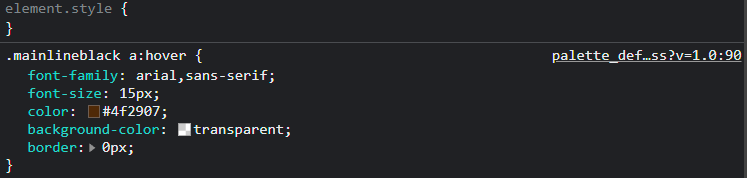
has anyone else figured out which code it is for the hover on the sales history link? I thought it was the .wpbutton a:hover but that doesn't seem to work :/
Custom Palette CSS stylesSeptember 4, 2022 10:12 AM


Vennenum

Darkseeker
 
Posts:5797
#2803688
Give Award
Eno - I took a quick look as I currently dont have time to be editing palettes. It seems weird, but this seems to work:
screenshot-33.png
Custom Palette CSS stylesSeptember 4, 2022 05:49 PM


Eno

Darkseeker
 
Posts:558
#2803817
Give Award
Vennenum said:
Eno - I took a quick look as I currently dont have time to be editing palettes. It seems weird, but this seems to work:
screenshot-33.png
Oooh yes, I forgot to add that. Thanks a bunch ^^

Forums > Member Help > Guides
   1   ..    27    28    29    30    31   ..   47 

Refresh