Wolf Play Game

Wolf Play Game
 Fall Month: 3   Day   Sunny
    

Chatbox
 Owlstar
05:06:22 tiger\Owl|she\her
Evergreen what are you gonna call it? I like it too :3
 Xanthia
05:06:06 Vash | Xy
:|
 Empress Midnight
05:05:59 Lucky Frog Empress
Juicy

You’re welcome
 EvergreenHills
05:05:00 Juicy Arm Boy
Empress
Thank you <3
 Empress Midnight
05:02:04 Lucky Frog Empress
Juicy

I like it!
 EvergreenHills
05:01:56 Juicy Arm Boy
Khans
Yeah they do haha

Thank youu <3 first time entering OwO
 Kháos
05:01:20 Kaos || Kháos
The feet feel off, but it looks gorgeous otherwise!
 EvergreenHills
05:00:26 Juicy Arm Boy
Thoughts? Might change the feet -Click-
 Kháos
04:59:49 Kaos || Kháos
I wish you luck! I would have gone down a medical route, but I unfortunately cannot stomach too much.
 CHEF
04:55:43 🍳
I’m trying to go for medicine but it’s a loooong route
 Xanthia
04:54:35 Vash | Xy
I feel like my nap that I took needs a nap because I'm still super tired but I don't want to sleep😭
 Kháos
04:54:11 Kaos || Kháos
I'm not sure yet, but I know that I want coding to be a huge part of my life and my advisors said that based on what I told them, cyber defense would be the best major for me to go for!
 CHEF
04:52:34 🍳
Cyber defense!
That’s so cool
Are you trying to work for the CIA or other intelligence agencies in the future?
 Kháos
04:51:48 Kaos || Kháos
I'm trying for cyber defense.
 CHEF
04:50:47 🍳
Khaos
Wow what major?
Congrats!
 Xanthia
04:48:50 Vash | Xy
Vortex
YAY! that's awesome :DD
 Kháos
04:46:28 Kaos || Kháos
Thank you all. 🥹

Ultra-
I passed my midterm! I just finished it and it automatically grades and I passed. I've been so nervous to take it the last two weeks.
 Xanthia
04:45:19 Vash | Xy
What'd you pass :0 and yayyy
 Empress Midnight
04:45:03 Lucky Frog Empress
Khaos

Excellent. I knew you could do it
 Empress Midnight
04:44:30 Lucky Frog Empress
Khaos

You made through

Refresh

You must be a registered member for more
than 1 day before you can use our chatbox.


Quests

Embark on a Quest.

Alliance Battles

Join an Alliance.

Challenges

Hourly Damage Variances
Black Panther : -2
Bobcat : +4
Bobcat : +3


WolfPlay Game
Chatbox
 Owlstar
05:06:22 tiger\Owl|she\her
Evergreen what are you gonna call it? I like it too :3
 Xanthia
05:06:06 Vash | Xy
:|
 Empress Midnight
05:05:59 Lucky Frog Empress
Juicy

You’re welcome
 EvergreenHills
05:05:00 Juicy Arm Boy
Empress
Thank you <3
 Empress Midnight
05:02:04 Lucky Frog Empress
Juicy

I like it!
 EvergreenHills
05:01:56 Juicy Arm Boy
Khans
Yeah they do haha

Thank youu <3 first time entering OwO
 Kháos
05:01:20 Kaos || Kháos
The feet feel off, but it looks gorgeous otherwise!
 EvergreenHills
05:00:26 Juicy Arm Boy
Thoughts? Might change the feet -Click-
 Kháos
04:59:49 Kaos || Kháos
I wish you luck! I would have gone down a medical route, but I unfortunately cannot stomach too much.
 CHEF
04:55:43 🍳
I’m trying to go for medicine but it’s a loooong route
 Xanthia
04:54:35 Vash | Xy
I feel like my nap that I took needs a nap because I'm still super tired but I don't want to sleep😭
 Kháos
04:54:11 Kaos || Kháos
I'm not sure yet, but I know that I want coding to be a huge part of my life and my advisors said that based on what I told them, cyber defense would be the best major for me to go for!
 CHEF
04:52:34 🍳
Cyber defense!
That’s so cool
Are you trying to work for the CIA or other intelligence agencies in the future?
 Kháos
04:51:48 Kaos || Kháos
I'm trying for cyber defense.
 CHEF
04:50:47 🍳
Khaos
Wow what major?
Congrats!
 Xanthia
04:48:50 Vash | Xy
Vortex
YAY! that's awesome :DD
 Kháos
04:46:28 Kaos || Kháos
Thank you all. 🥹

Ultra-
I passed my midterm! I just finished it and it automatically grades and I passed. I've been so nervous to take it the last two weeks.
 Xanthia
04:45:19 Vash | Xy
What'd you pass :0 and yayyy
 Empress Midnight
04:45:03 Lucky Frog Empress
Khaos

Excellent. I knew you could do it
 Empress Midnight
04:44:30 Lucky Frog Empress
Khaos

You made through


Refresh

You must be a member for more than 1 day before you can chat.

Forums

→ WolfPlay is a fun game! Sign Up Now!


My Subscriptions
My Bookmarks
My Topics
Latest Topics
Following

Forums > Member Help > Guides
   1 

Screenshot How-ToDecember 21, 2017 08:27 PM


Vennenum

Darkseeker
 
Posts:5797
#410723
Give Award
Why learn to screenshot?
Perhaps you'd like to show someone something you saw on site. Maybe you need to submit a bug report and let staff members know what's going on. Or even more urgently, you need to submit a report to a moderator and the moderator is asking for proof.

Images tell a thousand stories. And a screenshot helps detail what you want to tell someone.

Computers

How do you screenshot?
How your particular computer deals with screenshotting relies on a few factors.

First, check your computer type: Is it Windows or Macintosh? A Windows computer will have the Microsoft "Windows" logo on the corner of your screen, which looks like a rectangle divided into fourths. Macintosh computers will have the Apple located on the top left corner of your computer screen; it literally looks like an apple.

Windows:

Macintosh:

If your computer is a Macintosh, screenshotting is very simple. Press Command+Shift+4, then click+drag over your desired region. Release your mouse and your screenshot should be saved to your desktop under "Picture #".

For Windows, there's a little more workaround but it is still rather simple, and there are multiple ways you can take screenshots.

1 - Press "Print Screen" or "Prt Sc" on your computer keyboard. You may have to activate it by pressing the Fn button depending on what model computer or keyboard you have. Your entire computer screen will be copied to your clipboard as an image. You can either: (a) paste this into your Paint application to save to your computer or (b) directly paste this into an image host (which we will talk about later).

2 - Use the Snipping Tool. Most newer computers should have this software already installed into your computer. If your computer doesn't have it, don't fret. There are several other ways to take screenshots.
Open your Snipping Tool by selecting it in the Start Menu or using the search:
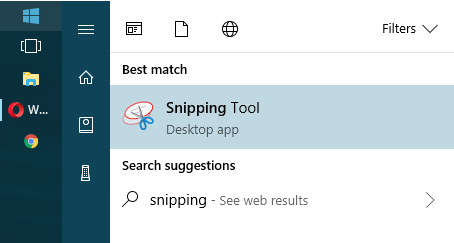
Then go through the various modes until you find what suits you best. Once you've taken a screenshot, you can save it to your computer or upload it to an image host.

3 - Download a screenshot program. There are various ones out there; simply find the one that suits you best. Gyazo and Puush are some pretty popular ones. You can take a screenshot with a click of a button (or with a keyboard shortcut). The screenshots will automatically upload to their respective websites. Just keep in mind they will delete after a couple months if there are no incoming views.

4 - Use a browser extension. I'm not too familiar with extensions that take screenshots. However, the browser I use (Opera) does come with a screenshot system where I can simply copy the screencap to my clipboard and directly upload it to an image host. Take a look at what your browser offers. It might be helpful.

Phones

Will finish someday

Edited at April 25, 2020 04:31 AM by Ciúin.
Screenshot How-ToDecember 21, 2017 08:30 PM


Vennenum

Darkseeker
 
Posts:5797
#410732
Give Award
I've taken the screenshot. How do I share it?
Images saved to your computer can only be displayed if you upload it to an image host. Using Postimages.cc, press upload and:
(a) paste your screenshot directly into the website or
(b) upload it using the file browser.

Image hosts operate in generally the same way, so what works for one might work for another.

Once you've uploaded the screenshot, feel free to share it wherever you need to.

Edited at March 19, 2019 07:39 AM by Vennenum
Screenshot How-ToDecember 4, 2019 10:37 PM


Former Pack

Neutral
 
Posts:0
#1741116
Give Award
I know how to take a screenshot on my tablet, but I dont know how to send it through WP. How do you send pictures/screenshots through WP to people?
Screenshot How-ToDecember 4, 2019 10:39 PM


Vennenum

Darkseeker
 
Posts:5797
#1741117
Give Award
Upload it to https://postimages.org/ and give the person the direct link.
Screenshot How-ToDecember 5, 2019 09:44 AM


Former Pack

Neutral
 
Posts:0
#1741388
Give Award
Oh, okay, thank you so much!
Screenshot How-ToDecember 6, 2019 11:54 AM


Former Pack

Neutral
 
Posts:0
#1742943
Give Award
A bit of a note on the Mac, I have one and I have to do command+shift+5 to being to select and area, otherwise when pressing 4 it just takes a full screenshot of the entire screen. I don't know if that's just mine for some reason-
Screenshot How-ToJanuary 1, 2020 08:05 PM


Vennenum

Darkseeker
 
Posts:5797
#1775035
Give Award
Fómhar said:
A bit of a note on the Mac, I have one and I have to do command+shift+5 to being to select and area, otherwise when pressing 4 it just takes a full screenshot of the entire screen. I don't know if that's just mine for some reason-

It might have changed since the last time I used a Mac. It's been a few years ^_^
Screenshot How-ToJanuary 1, 2020 10:30 PM


Former Pack

Neutral
 
Posts:0
#1775201
Give Award
My favorite screenshotting program is Lightshot!

It's free, easy to work with, and I believe compatible with both windows and mac?

It's a lifesaver between sharing commission WIPs and screenshotting things to report!
Screenshot How-ToMay 3, 2023 03:42 PM


Former Pack

Neutral
 
Posts:0
#2884726
Give Award
Mod edit: Do not spam please.

Edited at May 5, 2023 11:58 AM by Vennenum

Forums > Member Help > Guides
   1 

Refresh