Wolf Play Game

Wolf Play Game
 Winter Month: 1   Night   Sleet  Moon: 
      
Fri 04:52am  
Packs Online:  34 
Chatbox
 white tail
04:19:20 Tails/ Fishy
Beryl
its 2 am for me I lost track of time I'm going to head to bed good night!
 Beryl
04:14:53 
No, l’m still here!
 Beryl
04:14:40 
Oh!
 white tail
04:13:15 Tails/ Fishy
did I kill chat?
 white tail
04:05:37 Tails/ Fishy
its been four years I think I'm going to make a PFP tomorrow XD
 white tail
04:02:57 Tails/ Fishy
there I feel like the lantern makes it look much better
 white tail
04:01:04 Tails/ Fishy
-WP Click-
I feel like the gear conflicts with each other I'll try to find more gear.
rip half my mush
 Beryl
04:00:20 
Is it weird that I just convinced my sister that I was being really kind by pretending to punch her?
 Beryl
03:57:05 
What is happening?! I always lose and suddenly I am not anymore!
 white tail
03:55:51 Tails/ Fishy
Beryl
Thank you!
 Beryl
03:55:36 
Fishy
They all look amazing!
 white tail
03:55:25 Tails/ Fishy
Beryl
Nice!
 Beryl
03:54:55 
O!! I just won again!
 white tail
03:54:44 Tails/ Fishy
done with a few of my wolves >:3
-WP Click-
-WP Click-
-WP Click-
-WP Click-
what do y'all think?
 Beryl
03:53:24 
It’s only my 2nd time winning
 Beryl
03:52:53 
Yay!!! I won against WyndDancer!!
 Beryl
03:48:26 
Destinations End
Hi!
 white tail
03:48:15 Tails/ Fishy
Desti
Hello!
 white tail
03:48:05 Tails/ Fishy
Blue
Im sorry! I got wolves to make goth XD
 Destinations End
03:47:59 Toliska, Desti, Coy
Hey

Refresh

You must be a registered member for more
than 1 day before you can use our chatbox.


Quests

Embark on a Quest.

Alliance Battles

Join an Alliance.

Challenges

Hourly Damage Variances
Cougar : +2
Alligator : -1
Red Fox : +1


WolfPlay Game
Chatbox
 white tail
04:19:20 Tails/ Fishy
Beryl
its 2 am for me I lost track of time I'm going to head to bed good night!
 Beryl
04:14:53 
No, l’m still here!
 Beryl
04:14:40 
Oh!
 white tail
04:13:15 Tails/ Fishy
did I kill chat?
 white tail
04:05:37 Tails/ Fishy
its been four years I think I'm going to make a PFP tomorrow XD
 white tail
04:02:57 Tails/ Fishy
there I feel like the lantern makes it look much better
 white tail
04:01:04 Tails/ Fishy
-WP Click-
I feel like the gear conflicts with each other I'll try to find more gear.
rip half my mush
 Beryl
04:00:20 
Is it weird that I just convinced my sister that I was being really kind by pretending to punch her?
 Beryl
03:57:05 
What is happening?! I always lose and suddenly I am not anymore!
 white tail
03:55:51 Tails/ Fishy
Beryl
Thank you!
 Beryl
03:55:36 
Fishy
They all look amazing!
 white tail
03:55:25 Tails/ Fishy
Beryl
Nice!
 Beryl
03:54:55 
O!! I just won again!
 white tail
03:54:44 Tails/ Fishy
done with a few of my wolves >:3
-WP Click-
-WP Click-
-WP Click-
-WP Click-
what do y'all think?
 Beryl
03:53:24 
It’s only my 2nd time winning
 Beryl
03:52:53 
Yay!!! I won against WyndDancer!!
 Beryl
03:48:26 
Destinations End
Hi!
 white tail
03:48:15 Tails/ Fishy
Desti
Hello!
 white tail
03:48:05 Tails/ Fishy
Blue
Im sorry! I got wolves to make goth XD
 Destinations End
03:47:59 Toliska, Desti, Coy
Hey


Refresh

You must be a member for more than 1 day before you can chat.

Forums

→ WolfPlay is a fun game! Sign Up Now!


My Subscriptions
My Bookmarks
My Topics
Latest Topics
Following

Forums > Member Help > Guides
   1 

Screenshot How-ToDecember 21, 2017 08:27 PM


Vennenum

Darkseeker
 
Posts:5797
#410723
Give Award
Why learn to screenshot?
Perhaps you'd like to show someone something you saw on site. Maybe you need to submit a bug report and let staff members know what's going on. Or even more urgently, you need to submit a report to a moderator and the moderator is asking for proof.

Images tell a thousand stories. And a screenshot helps detail what you want to tell someone.

Computers

How do you screenshot?
How your particular computer deals with screenshotting relies on a few factors.

First, check your computer type: Is it Windows or Macintosh? A Windows computer will have the Microsoft "Windows" logo on the corner of your screen, which looks like a rectangle divided into fourths. Macintosh computers will have the Apple located on the top left corner of your computer screen; it literally looks like an apple.

Windows:

Macintosh:

If your computer is a Macintosh, screenshotting is very simple. Press Command+Shift+4, then click+drag over your desired region. Release your mouse and your screenshot should be saved to your desktop under "Picture #".

For Windows, there's a little more workaround but it is still rather simple, and there are multiple ways you can take screenshots.

1 - Press "Print Screen" or "Prt Sc" on your computer keyboard. You may have to activate it by pressing the Fn button depending on what model computer or keyboard you have. Your entire computer screen will be copied to your clipboard as an image. You can either: (a) paste this into your Paint application to save to your computer or (b) directly paste this into an image host (which we will talk about later).

2 - Use the Snipping Tool. Most newer computers should have this software already installed into your computer. If your computer doesn't have it, don't fret. There are several other ways to take screenshots.
Open your Snipping Tool by selecting it in the Start Menu or using the search:
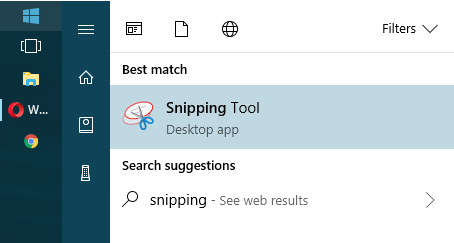
Then go through the various modes until you find what suits you best. Once you've taken a screenshot, you can save it to your computer or upload it to an image host.

3 - Download a screenshot program. There are various ones out there; simply find the one that suits you best. Gyazo and Puush are some pretty popular ones. You can take a screenshot with a click of a button (or with a keyboard shortcut). The screenshots will automatically upload to their respective websites. Just keep in mind they will delete after a couple months if there are no incoming views.

4 - Use a browser extension. I'm not too familiar with extensions that take screenshots. However, the browser I use (Opera) does come with a screenshot system where I can simply copy the screencap to my clipboard and directly upload it to an image host. Take a look at what your browser offers. It might be helpful.

Phones

Will finish someday

Edited at April 25, 2020 04:31 AM by Ciúin.
Screenshot How-ToDecember 21, 2017 08:30 PM


Vennenum

Darkseeker
 
Posts:5797
#410732
Give Award
I've taken the screenshot. How do I share it?
Images saved to your computer can only be displayed if you upload it to an image host. Using https://gifyu.com/, press upload and:
(a) paste your screenshot directly into the website or
(b) upload it using the file browser.
Image hosts operate in generally the same way, so what works for one might work for another.
Once you've uploaded the screenshot, feel free to share it wherever you need to.

Edited at April 15, 2026 06:54 PM by Kháos
Screenshot How-ToDecember 4, 2019 10:37 PM


Former Pack

Neutral
 
Posts:0
#1741116
Give Award
I know how to take a screenshot on my tablet, but I dont know how to send it through WP. How do you send pictures/screenshots through WP to people?
Screenshot How-ToDecember 4, 2019 10:39 PM


Vennenum

Darkseeker
 
Posts:5797
#1741117
Give Award
Upload it to https://postimages.org/ and give the person the direct link.
Screenshot How-ToDecember 5, 2019 09:44 AM


Former Pack

Neutral
 
Posts:0
#1741388
Give Award
Oh, okay, thank you so much!
Screenshot How-ToDecember 6, 2019 11:54 AM


Former Pack

Neutral
 
Posts:0
#1742943
Give Award
A bit of a note on the Mac, I have one and I have to do command+shift+5 to being to select and area, otherwise when pressing 4 it just takes a full screenshot of the entire screen. I don't know if that's just mine for some reason-
Screenshot How-ToJanuary 1, 2020 08:05 PM


Vennenum

Darkseeker
 
Posts:5797
#1775035
Give Award
Fómhar said:
A bit of a note on the Mac, I have one and I have to do command+shift+5 to being to select and area, otherwise when pressing 4 it just takes a full screenshot of the entire screen. I don't know if that's just mine for some reason-

It might have changed since the last time I used a Mac. It's been a few years ^_^
Screenshot How-ToJanuary 1, 2020 10:30 PM


Former Pack

Neutral
 
Posts:0
#1775201
Give Award
My favorite screenshotting program is Lightshot!

It's free, easy to work with, and I believe compatible with both windows and mac?

It's a lifesaver between sharing commission WIPs and screenshotting things to report!

Forums > Member Help > Guides
   1 

Refresh