Wolf Play Game

Wolf Play Game
 Fall Month: 3   Night   Clear  Moon: 
      

Chatbox
 Moonfall
02:59:15 Many moons, one me
Eden, that's impressive. Hope anyone on the path is alright. Hope your finger feels better
Thanks Scorpion, I'll put them up for auction after Penelope gives me her pups
See ya Xanth
 Sabbath
02:59:08 Rook
Kitty
Yeah :(
 Giftofeden
02:58:29 Eden/ Key/ TS
xylo

see you around :D
 Xanthia
02:57:40 Vash | Xy
okay im off again
bye chat

key as always nice seeing you<3
 Giftofeden
02:57:07 Eden/ Key/ TS
I saw the tornado thingy on FB funnily enough
 Pink kitty🐈
02:57:03 Kneecap stealer
Isn't it only for premium only
 Giftofeden
02:56:36 Eden/ Key/ TS
Owl, Xylo

I currently got it in a plaster but it's looking good-ish??
 Owlstar
02:55:33 tiger\Owl|she\her
Key oof. Your finger ok??
 Xanthia
02:55:22 Vash | Xy
Key
hectic stuff thats crazy :00
i hope your fingers okayy
 Sabbath
02:55:12 Rook
pup toys update best WP update of 2026 omg
 Owlstar
02:54:46 tiger\Owl|she\her
No problem! 😉
 Giftofeden
02:54:34 Eden/ Key/ TS
Xylo

The window smashed open, my computer got showered with rain(it's okay) and while trying to close the window, my finger got smashed
 SouthernScorpion
02:54:19 Scorpion
personally moonfall i wouldn't keep
-WP Click-
-WP Click-
-WP Click-
 Xanthia
02:54:08 Vash | Xy
Tiger
aw thank you i aprpeciate it<3 XD
 skeet
02:53:45 
Yay I can finally use my crystalline pelt dyes on some of my wolves without worrying if there’s a stud with the same base coat available 🙏🏻
 Giftofeden
02:53:28 Eden/ Key/ TS
OWL

My city doesnt get tornados EVER. we thought it was a freak storm.
 Xanthia
02:52:57 Vash | Xy
Key
thats crazy :00
hope everyones okay
 Owlstar
02:52:31 tiger\Owl|she\her
Key HOW DID YOU NOT NOTICE?!?!?!?!
 Moonfall
02:52:10 Many moons, one me
Can someone look at my den and tell me who to purge? I really need to downsize and other than the top 11 (12 including opal currently on loan) I have no idea who to keep and who needs to go
 Owlstar
02:52:09 tiger\Owl|she\her
Xy I’m thinking of starting art commissions! I can only do traditional feral right now XDD you can ask about anything and everything if you are interested

Refresh

You must be a registered member for more
than 1 day before you can use our chatbox.


Quests

Embark on a Quest.

Alliance Battles

Join an Alliance.

Challenges

Hourly Damage Variances
Brown Bear : -1
Death Adder : -4
Spotted Hyena : +5


WolfPlay Game
Chatbox
 Moonfall
02:59:15 Many moons, one me
Eden, that's impressive. Hope anyone on the path is alright. Hope your finger feels better
Thanks Scorpion, I'll put them up for auction after Penelope gives me her pups
See ya Xanth
 Sabbath
02:59:08 Rook
Kitty
Yeah :(
 Giftofeden
02:58:29 Eden/ Key/ TS
xylo

see you around :D
 Xanthia
02:57:40 Vash | Xy
okay im off again
bye chat

key as always nice seeing you<3
 Giftofeden
02:57:07 Eden/ Key/ TS
I saw the tornado thingy on FB funnily enough
 Pink kitty🐈
02:57:03 Kneecap stealer
Isn't it only for premium only
 Giftofeden
02:56:36 Eden/ Key/ TS
Owl, Xylo

I currently got it in a plaster but it's looking good-ish??
 Owlstar
02:55:33 tiger\Owl|she\her
Key oof. Your finger ok??
 Xanthia
02:55:22 Vash | Xy
Key
hectic stuff thats crazy :00
i hope your fingers okayy
 Sabbath
02:55:12 Rook
pup toys update best WP update of 2026 omg
 Owlstar
02:54:46 tiger\Owl|she\her
No problem! 😉
 Giftofeden
02:54:34 Eden/ Key/ TS
Xylo

The window smashed open, my computer got showered with rain(it's okay) and while trying to close the window, my finger got smashed
 SouthernScorpion
02:54:19 Scorpion
personally moonfall i wouldn't keep
-WP Click-
-WP Click-
-WP Click-
 Xanthia
02:54:08 Vash | Xy
Tiger
aw thank you i aprpeciate it<3 XD
 skeet
02:53:45 
Yay I can finally use my crystalline pelt dyes on some of my wolves without worrying if there’s a stud with the same base coat available 🙏🏻
 Giftofeden
02:53:28 Eden/ Key/ TS
OWL

My city doesnt get tornados EVER. we thought it was a freak storm.
 Xanthia
02:52:57 Vash | Xy
Key
thats crazy :00
hope everyones okay
 Owlstar
02:52:31 tiger\Owl|she\her
Key HOW DID YOU NOT NOTICE?!?!?!?!
 Moonfall
02:52:10 Many moons, one me
Can someone look at my den and tell me who to purge? I really need to downsize and other than the top 11 (12 including opal currently on loan) I have no idea who to keep and who needs to go
 Owlstar
02:52:09 tiger\Owl|she\her
Xy I’m thinking of starting art commissions! I can only do traditional feral right now XDD you can ask about anything and everything if you are interested


Refresh

You must be a member for more than 1 day before you can chat.

Forums

→ WolfPlay is a fun game! Sign Up Now!


My Subscriptions
My Bookmarks
My Topics
Latest Topics
Following

Forums > Member Help > Guides
   1 

Screenshot How-ToDecember 21, 2017 08:27 PM


Vennenum

Darkseeker
 
Posts:5797
#410723
Give Award
Why learn to screenshot?
Perhaps you'd like to show someone something you saw on site. Maybe you need to submit a bug report and let staff members know what's going on. Or even more urgently, you need to submit a report to a moderator and the moderator is asking for proof.

Images tell a thousand stories. And a screenshot helps detail what you want to tell someone.

Computers

How do you screenshot?
How your particular computer deals with screenshotting relies on a few factors.

First, check your computer type: Is it Windows or Macintosh? A Windows computer will have the Microsoft "Windows" logo on the corner of your screen, which looks like a rectangle divided into fourths. Macintosh computers will have the Apple located on the top left corner of your computer screen; it literally looks like an apple.

Windows:

Macintosh:

If your computer is a Macintosh, screenshotting is very simple. Press Command+Shift+4, then click+drag over your desired region. Release your mouse and your screenshot should be saved to your desktop under "Picture #".

For Windows, there's a little more workaround but it is still rather simple, and there are multiple ways you can take screenshots.

1 - Press "Print Screen" or "Prt Sc" on your computer keyboard. You may have to activate it by pressing the Fn button depending on what model computer or keyboard you have. Your entire computer screen will be copied to your clipboard as an image. You can either: (a) paste this into your Paint application to save to your computer or (b) directly paste this into an image host (which we will talk about later).

2 - Use the Snipping Tool. Most newer computers should have this software already installed into your computer. If your computer doesn't have it, don't fret. There are several other ways to take screenshots.
Open your Snipping Tool by selecting it in the Start Menu or using the search:
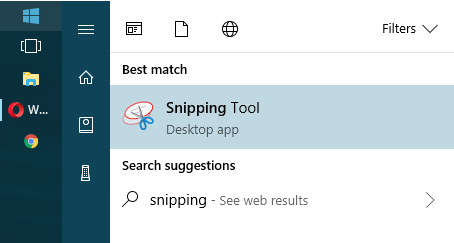
Then go through the various modes until you find what suits you best. Once you've taken a screenshot, you can save it to your computer or upload it to an image host.

3 - Download a screenshot program. There are various ones out there; simply find the one that suits you best. Gyazo and Puush are some pretty popular ones. You can take a screenshot with a click of a button (or with a keyboard shortcut). The screenshots will automatically upload to their respective websites. Just keep in mind they will delete after a couple months if there are no incoming views.

4 - Use a browser extension. I'm not too familiar with extensions that take screenshots. However, the browser I use (Opera) does come with a screenshot system where I can simply copy the screencap to my clipboard and directly upload it to an image host. Take a look at what your browser offers. It might be helpful.

Phones

Will finish someday

Edited at April 25, 2020 04:31 AM by Ciúin.
Screenshot How-ToDecember 21, 2017 08:30 PM


Vennenum

Darkseeker
 
Posts:5797
#410732
Give Award
I've taken the screenshot. How do I share it?
Images saved to your computer can only be displayed if you upload it to an image host. Using Postimages.cc, press upload and:
(a) paste your screenshot directly into the website or
(b) upload it using the file browser.

Image hosts operate in generally the same way, so what works for one might work for another.

Once you've uploaded the screenshot, feel free to share it wherever you need to.

Edited at March 19, 2019 07:39 AM by Vennenum
Screenshot How-ToDecember 4, 2019 10:37 PM


Former Pack

Neutral
 
Posts:0
#1741116
Give Award
I know how to take a screenshot on my tablet, but I dont know how to send it through WP. How do you send pictures/screenshots through WP to people?
Screenshot How-ToDecember 4, 2019 10:39 PM


Vennenum

Darkseeker
 
Posts:5797
#1741117
Give Award
Upload it to https://postimages.org/ and give the person the direct link.
Screenshot How-ToDecember 5, 2019 09:44 AM


Former Pack

Neutral
 
Posts:0
#1741388
Give Award
Oh, okay, thank you so much!
Screenshot How-ToDecember 6, 2019 11:54 AM


Former Pack

Neutral
 
Posts:0
#1742943
Give Award
A bit of a note on the Mac, I have one and I have to do command+shift+5 to being to select and area, otherwise when pressing 4 it just takes a full screenshot of the entire screen. I don't know if that's just mine for some reason-
Screenshot How-ToJanuary 1, 2020 08:05 PM


Vennenum

Darkseeker
 
Posts:5797
#1775035
Give Award
Fómhar said:
A bit of a note on the Mac, I have one and I have to do command+shift+5 to being to select and area, otherwise when pressing 4 it just takes a full screenshot of the entire screen. I don't know if that's just mine for some reason-

It might have changed since the last time I used a Mac. It's been a few years ^_^
Screenshot How-ToJanuary 1, 2020 10:30 PM


Former Pack

Neutral
 
Posts:0
#1775201
Give Award
My favorite screenshotting program is Lightshot!

It's free, easy to work with, and I believe compatible with both windows and mac?

It's a lifesaver between sharing commission WIPs and screenshotting things to report!
Screenshot How-ToMay 3, 2023 03:42 PM


Former Pack

Neutral
 
Posts:0
#2884726
Give Award
Mod edit: Do not spam please.

Edited at May 5, 2023 11:58 AM by Vennenum

Forums > Member Help > Guides
   1 

Refresh