Wolf Play Game

Wolf Play Game
 Winter Month: 3   Night   Clear  Moon: 
      

Chatbox
 Owlstar
08:05:35 tiger\Owl|she\her
-WP Click- is my quasar I dyed him lol
 Jester
08:05:20 
I don't know what a quasar is but he'll yeah!
 Quasar Hoarder
08:04:25 Quasar, QH
-WP Click-

-WP Click-

Woo-hoo two natural quasars in a row!
 Owlstar
08:04:25 tiger\Owl|she\her
moon, the fennic fox has come to help keep ya secret
 Jester
08:04:15 
?
 Jester
08:03:38 
Hello
 MoonBound
08:03:30 Moon, MJ
Heya guys. Just logged in (in secret still 😭) to keep my account here, and to update my About Pack bio so that I can add my updated website link there. I do have a chat there… the only place I can chat to you guys now :,)

Oof. Lemme stop yapping before I get caught! 😭
Byee
 Owlstar
08:01:06 tiger\Owl|she\her
hi dawn!!
 Black Dawn Den
08:00:16 Dawn
Hello chat!
 Jester
07:56:16 
Thank you chat
 Owlstar
07:54:35 tiger\Owl|she\her
by demon!!! see yaaaa!!! im ready to stalk khaos
 Doodle Dragon
07:54:04 He/They pronouns
Ravenpaw,
Sorry for the late reply, I'm doing good ^^
 Night Raven College
07:51:58 NRC/Night/Raven
But yeah I gotta go bye
 Jester
07:51:07 
Oh okay
 Night Raven College
07:50:42 NRC/Night/Raven
Your*
 Night Raven College
07:50:05 NRC/Night/Raven
Scroll down to the very bottom of you den and it will say manage folders click that and you can see it.
 Jester
07:49:21 
Oh how do I look at those
 Night Raven College
07:49:08 NRC/Night/Raven
I think I'm not on level 20 yet
 Night Raven College
07:48:56 NRC/Night/Raven
Jester
It's a folder background
 Jester
07:48:34 
What background do you get for getting lvl 20 forest it said I unlocked but not sure which it is

Refresh

You must be a registered member for more
than 1 day before you can use our chatbox.


Quests

Embark on a Quest.

Alliance Battles

Join an Alliance.

Challenges

Hourly Damage Variances
Anaconda : -3
Harpy Eagle : -2
Wolverine : +5


WolfPlay Game
Chatbox
 Owlstar
08:05:35 tiger\Owl|she\her
-WP Click- is my quasar I dyed him lol
 Jester
08:05:20 
I don't know what a quasar is but he'll yeah!
 Quasar Hoarder
08:04:25 Quasar, QH
-WP Click-

-WP Click-

Woo-hoo two natural quasars in a row!
 Owlstar
08:04:25 tiger\Owl|she\her
moon, the fennic fox has come to help keep ya secret
 Jester
08:04:15 
?
 Jester
08:03:38 
Hello
 MoonBound
08:03:30 Moon, MJ
Heya guys. Just logged in (in secret still 😭) to keep my account here, and to update my About Pack bio so that I can add my updated website link there. I do have a chat there… the only place I can chat to you guys now :,)

Oof. Lemme stop yapping before I get caught! 😭
Byee
 Owlstar
08:01:06 tiger\Owl|she\her
hi dawn!!
 Black Dawn Den
08:00:16 Dawn
Hello chat!
 Jester
07:56:16 
Thank you chat
 Owlstar
07:54:35 tiger\Owl|she\her
by demon!!! see yaaaa!!! im ready to stalk khaos
 Doodle Dragon
07:54:04 He/They pronouns
Ravenpaw,
Sorry for the late reply, I'm doing good ^^
 Night Raven College
07:51:58 NRC/Night/Raven
But yeah I gotta go bye
 Jester
07:51:07 
Oh okay
 Night Raven College
07:50:42 NRC/Night/Raven
Your*
 Night Raven College
07:50:05 NRC/Night/Raven
Scroll down to the very bottom of you den and it will say manage folders click that and you can see it.
 Jester
07:49:21 
Oh how do I look at those
 Night Raven College
07:49:08 NRC/Night/Raven
I think I'm not on level 20 yet
 Night Raven College
07:48:56 NRC/Night/Raven
Jester
It's a folder background
 Jester
07:48:34 
What background do you get for getting lvl 20 forest it said I unlocked but not sure which it is


Refresh

You must be a member for more than 1 day before you can chat.

Forums

→ WolfPlay is a fun game! Sign Up Now!


My Subscriptions
My Bookmarks
My Topics
Latest Topics
Following

Forums > Artwork > Art Help
   1 

Making avatar ?April 29, 2020 03:25 AM


Former Pack

Neutral
 
Posts:0
#1986013
Give Award
So...this is weird,but I can't make avatars :/ I can draw something, but when I resize it to fit it gets blurry :'/ and...I dunno how to fix it and I figured I would ask here since I see some people have quite detailed pieces as avatar and still look great while my less detailed art gets blurred .-.

I just wish to know your secret guys <.<

Here is example of what should have been avatar,but...It's blurry.

Size: 550 x 550
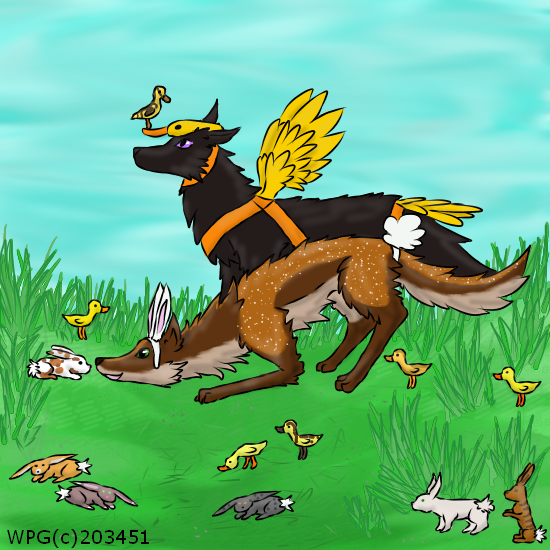
This below is 300 x 300 and looks just fine <.< but as avi !

-------------------------------------

My current avatar has same problem <.<

---------------

Help Q.Q

Making avatar ?April 29, 2020 05:12 AM


Former Pack

Neutral
 
Posts:0
#1986062
Give Award
What program do you use?
If you use photoshop, when you go to adjust image size the little window opens. At the bottom of that window it usually says Bicubic Automatic, try some of the other options there and see what looks best? If you use sai they might have a similar setting when you go to adjust image size?

Edited at April 29, 2020 05:22 AM by StormFang
Making avatar ?April 29, 2020 05:47 AM


Former Pack

Neutral
 
Posts:0
#1986065
Give Award
I use Fire Alpaca but I don't resize with it-gives even worse results.
And I use first thing that pops on Search online to resize them ×3
Making avatar ?April 29, 2020 06:06 AM


Former Pack

Neutral
 
Posts:0
#1986068
Give Award
I'm not sure how to help with those :,> sorry!
But i hope you find someone who can!
Making avatar ?April 29, 2020 07:13 AM


Former Pack

Neutral
 
Posts:0
#1986093
Give Award
Hey there! I use firealpaca too. Resizing will give you a bit of a blurry result basically no matter what. Next time you make an avatar, when you click "New" put make it 300x300 so you don't have to resize later.
-but it doesn't look very blurry to me and it's really cute!
Making avatar ?April 29, 2020 08:55 AM


Former Pack

Neutral
 
Posts:0
#1986194
Give Award
@Storm Fang thank you on honesty and nice motive :D
----------------
@flocklin thank you ^^ but that's kinda playing it safe which is good and all,but as I use smaller canvases there is also less detail :/ but maybe I should try experimenting more :3
Making avatar ?April 29, 2020 11:04 AM


Convivial

Darkseeker
 
Posts:3201
#1986494
Give Award
I paint with Ibis Paint and make the picture on a 300×300 so I wouldn't really know how to help
Making avatar ?April 29, 2020 11:10 AM


Former Pack

Neutral
 
Posts:0
#1986514
Give Award
This may help you out: Image Sharpener.
After sizing the image down to 300 x 300, import the image here, and use the sharpen tool. Sometimes it helps, sometimes it does not but the times it has, it was the only reason I could use an avatar image in clarity.
Making avatar ?April 29, 2020 12:02 PM


Former Pack

Neutral
 
Posts:0
#1986746
Give Award
@Dark°Halo thank you ^^
@Oakley sounds interesting and new...I'll try,thank you :3

Forums > Artwork > Art Help
   1 

Refresh