Wolf Play Game

Wolf Play Game
 Spring Month: 1   Night   Heavy Rain  Moon: 
      

Chatbox
 Winterfell
04:14:47 Winter
A emerald and a lupis
 Sleep
04:13:14 Kneecap stealer
What did the fox give you for my two geodes
 Winterfell
04:03:17 Winter
Sleep
I know
 MLadySkylar
03:57:36 P'Sky/Sky-kun
Meow
 Sleep
03:33:22 Kneecap stealer
Don't forget I sent you 2 geodes winter
 Winterfell
03:19:57 Winter
I now have every crystalline dye in the game <33 I will just hoard them xD
 Moonfall
03:00:55 Many moons, one me
I don't quite know what to do with her? Soup and try again? Or keep and see what happens?
-WP Click-
 Tonneoshet
02:26:09 Uncle Tony
Wish I had more den space, but I barely want half the wolves i keep xD
Now my ALLIANCE slots on the other hand-
 Andypaws
02:18:44 Andy [he/they]
Moonfall

oh yeah some people have an insane amount of den space
 Moonfall
02:16:54 Many moons, one me
I will say my flabbers do be ghasted when I visit other dens and see they have over 1000 wolves AND den space left over
 Moonfall
02:14:43 Many moons, one me
Andy
Of course!! Another thing is ff you have den card explore or den card stats selected in your own den, it'll show other dens that way
 Andypaws
02:14:23 Andy [he/they]
-WP Click- I found this in the suggestions forum
 Andypaws
02:13:33 Andy [he/they]
thank you both!
 Sabbath
02:12:49 Rook
Ah, I always forget about the different den views. I always just leave my den the way it is xD
 Moonfall
02:12:42 Many moons, one me
Looks like you have 13 wolves with 6 open spaces, so 19 all together
 Moonfall
02:11:15 Many moons, one me
Andy, you could put it into view>den card explore or den card stats then just under it at the top it'll tell you how many wolves you have. Then scrolling down to the very bottom it'll tell you how many slots are open
 Sabbath
02:09:37 Rook
I don't know if there's just a number somewhere though e.e
 Sabbath
02:09:10 Rook
Andy
I put my pack ID into trading post and then add up the number of results + number of empty spaces at the bottom of my den.
 Andypaws
02:07:44 Andy [he/they]
is there a way to see my overall den space outside of individually counting my wolves?
 Moonfall
02:06:02 Many moons, one me
Girl... You need to go into labor. I beg -WP Click-

Refresh

You must be a registered member for more
than 1 day before you can use our chatbox.


Quests

Embark on a Quest.

Alliance Battles

Join an Alliance.

Challenges

Hourly Damage Variances
Badger : +4
Grizzly Bear : +1
Margay : -3


WolfPlay Game
Chatbox
 Winterfell
04:14:47 Winter
A emerald and a lupis
 Sleep
04:13:14 Kneecap stealer
What did the fox give you for my two geodes
 Winterfell
04:03:17 Winter
Sleep
I know
 MLadySkylar
03:57:36 P'Sky/Sky-kun
Meow
 Sleep
03:33:22 Kneecap stealer
Don't forget I sent you 2 geodes winter
 Winterfell
03:19:57 Winter
I now have every crystalline dye in the game <33 I will just hoard them xD
 Moonfall
03:00:55 Many moons, one me
I don't quite know what to do with her? Soup and try again? Or keep and see what happens?
-WP Click-
 Tonneoshet
02:26:09 Uncle Tony
Wish I had more den space, but I barely want half the wolves i keep xD
Now my ALLIANCE slots on the other hand-
 Andypaws
02:18:44 Andy [he/they]
Moonfall

oh yeah some people have an insane amount of den space
 Moonfall
02:16:54 Many moons, one me
I will say my flabbers do be ghasted when I visit other dens and see they have over 1000 wolves AND den space left over
 Moonfall
02:14:43 Many moons, one me
Andy
Of course!! Another thing is ff you have den card explore or den card stats selected in your own den, it'll show other dens that way
 Andypaws
02:14:23 Andy [he/they]
-WP Click- I found this in the suggestions forum
 Andypaws
02:13:33 Andy [he/they]
thank you both!
 Sabbath
02:12:49 Rook
Ah, I always forget about the different den views. I always just leave my den the way it is xD
 Moonfall
02:12:42 Many moons, one me
Looks like you have 13 wolves with 6 open spaces, so 19 all together
 Moonfall
02:11:15 Many moons, one me
Andy, you could put it into view>den card explore or den card stats then just under it at the top it'll tell you how many wolves you have. Then scrolling down to the very bottom it'll tell you how many slots are open
 Sabbath
02:09:37 Rook
I don't know if there's just a number somewhere though e.e
 Sabbath
02:09:10 Rook
Andy
I put my pack ID into trading post and then add up the number of results + number of empty spaces at the bottom of my den.
 Andypaws
02:07:44 Andy [he/they]
is there a way to see my overall den space outside of individually counting my wolves?
 Moonfall
02:06:02 Many moons, one me
Girl... You need to go into labor. I beg -WP Click-


Refresh

You must be a member for more than 1 day before you can chat.

Forums

→ WolfPlay is a fun game! Sign Up Now!


My Subscriptions
My Bookmarks
My Topics
Latest Topics
Following

Forums > Artwork > Art Help
   1 

Update: I've been savedMay 13, 2020 04:50 PM


Former Pack

Neutral
 
Posts:0
#2026005
Give Award

Hello all. I am in dire need of assistance.

I made this art piece. But there is a problem with it. I know the lines are messy, but that is not the problem currently.
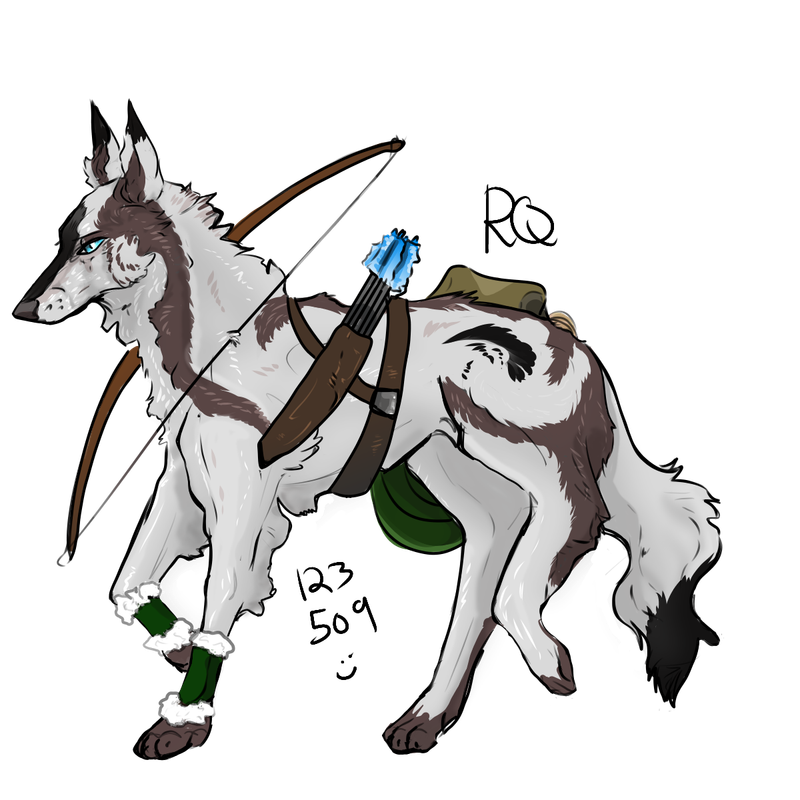
darker-version.png

Something about the coloring is throwing me off. I started to shade it, and then I had to stop because I started to have a bit of a freak out over it. I have legitimate OCD, so when this happens it is very frustrating as I get extremely overwhelmed and obsessive - it generally ends with me spending hours (not an exaggeration) staring at it before deleting it and starting over. It's just like a nails on a chalkboard feeling, aha, or like a cheek-chew kinda frustration, and then I start repeating myself over and over and things get out of hand. That's how I can explain it - sorry I'm quite bad at putting it to words.

Anyways I like the piece and I don't want to delete it, but I know something is wrong with it and with my current OCD predicament I don't have the rationality to figure out exactly what about it is bothering me. It just looks very...off.

Any thoughts? Or could it actually be the line thickness? Or is it the colors? I'm sorry my weirdness is showing a bit.


Edited at May 13, 2020 05:05 PM by Red Queen
Update: I've been savedMay 13, 2020 04:53 PM


Sir Froggington

Lightbringer
 
Posts:17829
#2026015
Give Award
Could it be line thickness?
Update: I've been savedMay 13, 2020 04:55 PM


Former Pack

Neutral
 
Posts:0
#2026023
Give Award
i don't know what your ocd triggers are but ,,, i dunno maybe it's the coolness of the brown compared to the warmness of the other colors???
Update: I've been savedMay 13, 2020 04:55 PM


Former Pack

Neutral
 
Posts:0
#2026027
Give Award
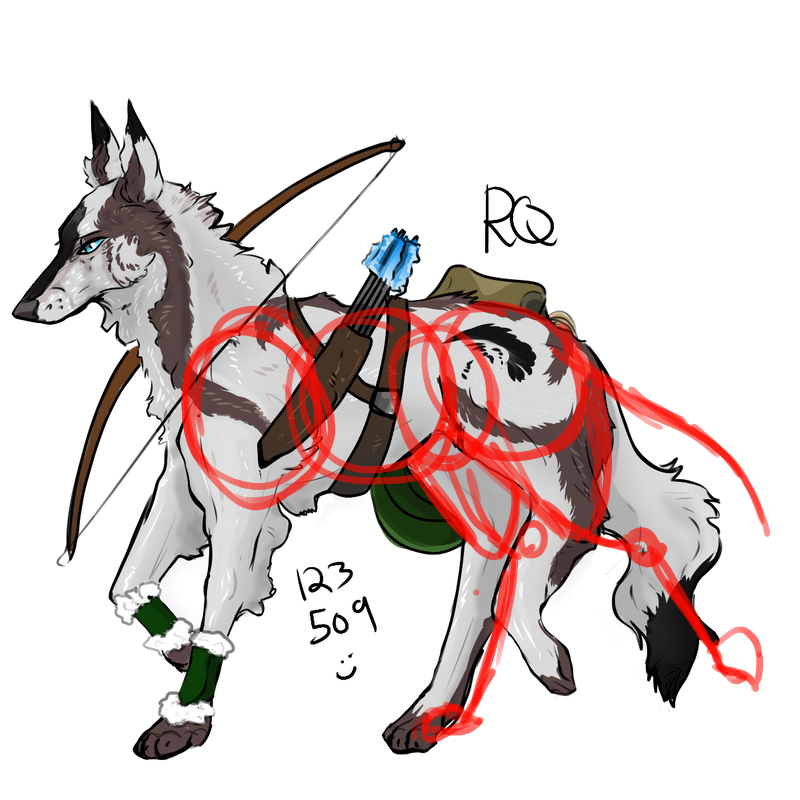
Hmm overall its a really good peice! The problem isn't with the shading, lines or color its really with the leg.
I'm not really good with explaining so I did a redline
Update: I've been savedMay 13, 2020 04:59 PM


Verzul

Neutral
 
Posts:119
#2026039
Give Award
Maybe the fact that the blue on the arrows and the blue of the eyes don't match?
Update: I've been savedMay 13, 2020 05:00 PM


Eternity

Art Team
Darkseeker
 
Posts:8840
#2026044
Give Award
I don't see anything wrong with the colouring nor the lines, they all look perfect to me.
However, the back leg on the nearside doesn't look quite right. Do you think that might have something to do with it? Or do you definitely know it's something to do with the colours/ and/or lines?


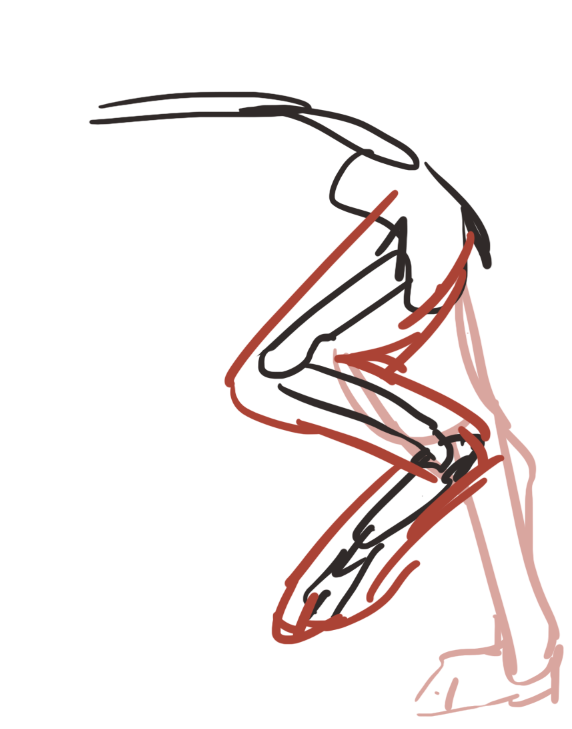
Maybe try something a bit like this for the legs? Or follow T r e a s u r e ' s ahah-
image.png
p[c]157083

Edited at May 13, 2020 05:03 PM by Eternity
Update: I've been savedMay 13, 2020 05:01 PM


Former Pack

Neutral
 
Posts:0
#2026049
Give Award

Ya'll are life savers ^^ I definitely need to thin out the lines but the leg problem, now pointed out, seems like it could be what's throwing my subconscious off.

The colors suggestions are also very helpful! I wasn't feeling this way when I had the brown as more of a cream color, so that's very astute.

I appreciate the help! I'm gonna try and apply the suggested changes to the piece now. It's hard for me with my OCD sometimes to problem solve, so I can't thank you guys enough for helping me out <3

Update: I've been savedMay 13, 2020 05:02 PM


Former Pack

Neutral
 
Posts:0
#2026052
Give Award

Eternity said:
I don't see anything wrong with the colouring nor the lines, they all look perfect to me.
However, the back leg on the nearside doesn't look quite right. Do you think that might have something to do with it? Or do you definitely know it's something to do with the colours/ and/or lines?
I'm not entirely sure, to be honest, but I'm definitely gonna try and fix the back legs as I think that might be the best bet ^u^ I appreciate you pointing it out!
Update: I've been savedMay 13, 2020 05:04 PM


Eternity

Art Team
Darkseeker
 
Posts:8840
#2026055
Give Award

Red Queen said:

Eternity said:
I don't see anything wrong with the colouring nor the lines, they all look perfect to me.
However, the back leg on the nearside doesn't look quite right. Do you think that might have something to do with it? Or do you definitely know it's something to do with the colours/ and/or lines?
I'm not entirely sure, to be honest, but I'm definitely gonna try and fix the back legs as I think that might be the best bet ^u^ I appreciate you pointing it out!


No problemo! It really is a stunning piece ahah-
I added a very quick leg sketch on my original post, I don't know if that'll help or not.
Update: I've been savedMay 13, 2020 05:05 PM


Former Pack

Neutral
 
Posts:0
#2026058
Give Award

Eternity said:

Red Queen said:

Eternity said:
I don't see anything wrong with the colouring nor the lines, they all look perfect to me.
However, the back leg on the nearside doesn't look quite right. Do you think that might have something to do with it? Or do you definitely know it's something to do with the colours/ and/or lines?
I'm not entirely sure, to be honest, but I'm definitely gonna try and fix the back legs as I think that might be the best bet ^u^ I appreciate you pointing it out!


No problemo! It really is a stunning piece ahah-
I added a very quick leg sketch on my original post, I don't know if that'll help or not.


Thanks so much! It helps tremendously <3

Forums > Artwork > Art Help
   1 

Refresh