Wolf Play Game

Wolf Play Game
 Spring Month: 1   Night   Heavy Rain  Moon: 
      

Chatbox
 Winterfell
04:14:47 Winter
A emerald and a lupis
 Sleep
04:13:14 Kneecap stealer
What did the fox give you for my two geodes
 Winterfell
04:03:17 Winter
Sleep
I know
 MLadySkylar
03:57:36 P'Sky/Sky-kun
Meow
 Sleep
03:33:22 Kneecap stealer
Don't forget I sent you 2 geodes winter
 Winterfell
03:19:57 Winter
I now have every crystalline dye in the game <33 I will just hoard them xD
 Moonfall
03:00:55 Many moons, one me
I don't quite know what to do with her? Soup and try again? Or keep and see what happens?
-WP Click-
 Tonneoshet
02:26:09 Uncle Tony
Wish I had more den space, but I barely want half the wolves i keep xD
Now my ALLIANCE slots on the other hand-
 Andypaws
02:18:44 Andy [he/they]
Moonfall

oh yeah some people have an insane amount of den space
 Moonfall
02:16:54 Many moons, one me
I will say my flabbers do be ghasted when I visit other dens and see they have over 1000 wolves AND den space left over
 Moonfall
02:14:43 Many moons, one me
Andy
Of course!! Another thing is ff you have den card explore or den card stats selected in your own den, it'll show other dens that way
 Andypaws
02:14:23 Andy [he/they]
-WP Click- I found this in the suggestions forum
 Andypaws
02:13:33 Andy [he/they]
thank you both!
 Sabbath
02:12:49 Rook
Ah, I always forget about the different den views. I always just leave my den the way it is xD
 Moonfall
02:12:42 Many moons, one me
Looks like you have 13 wolves with 6 open spaces, so 19 all together
 Moonfall
02:11:15 Many moons, one me
Andy, you could put it into view>den card explore or den card stats then just under it at the top it'll tell you how many wolves you have. Then scrolling down to the very bottom it'll tell you how many slots are open
 Sabbath
02:09:37 Rook
I don't know if there's just a number somewhere though e.e
 Sabbath
02:09:10 Rook
Andy
I put my pack ID into trading post and then add up the number of results + number of empty spaces at the bottom of my den.
 Andypaws
02:07:44 Andy [he/they]
is there a way to see my overall den space outside of individually counting my wolves?
 Moonfall
02:06:02 Many moons, one me
Girl... You need to go into labor. I beg -WP Click-

Refresh

You must be a registered member for more
than 1 day before you can use our chatbox.


Quests

Embark on a Quest.

Alliance Battles

Join an Alliance.

Challenges

Hourly Damage Variances
Badger : +4
Grizzly Bear : +1
Margay : -3


WolfPlay Game
Chatbox
 Winterfell
04:14:47 Winter
A emerald and a lupis
 Sleep
04:13:14 Kneecap stealer
What did the fox give you for my two geodes
 Winterfell
04:03:17 Winter
Sleep
I know
 MLadySkylar
03:57:36 P'Sky/Sky-kun
Meow
 Sleep
03:33:22 Kneecap stealer
Don't forget I sent you 2 geodes winter
 Winterfell
03:19:57 Winter
I now have every crystalline dye in the game <33 I will just hoard them xD
 Moonfall
03:00:55 Many moons, one me
I don't quite know what to do with her? Soup and try again? Or keep and see what happens?
-WP Click-
 Tonneoshet
02:26:09 Uncle Tony
Wish I had more den space, but I barely want half the wolves i keep xD
Now my ALLIANCE slots on the other hand-
 Andypaws
02:18:44 Andy [he/they]
Moonfall

oh yeah some people have an insane amount of den space
 Moonfall
02:16:54 Many moons, one me
I will say my flabbers do be ghasted when I visit other dens and see they have over 1000 wolves AND den space left over
 Moonfall
02:14:43 Many moons, one me
Andy
Of course!! Another thing is ff you have den card explore or den card stats selected in your own den, it'll show other dens that way
 Andypaws
02:14:23 Andy [he/they]
-WP Click- I found this in the suggestions forum
 Andypaws
02:13:33 Andy [he/they]
thank you both!
 Sabbath
02:12:49 Rook
Ah, I always forget about the different den views. I always just leave my den the way it is xD
 Moonfall
02:12:42 Many moons, one me
Looks like you have 13 wolves with 6 open spaces, so 19 all together
 Moonfall
02:11:15 Many moons, one me
Andy, you could put it into view>den card explore or den card stats then just under it at the top it'll tell you how many wolves you have. Then scrolling down to the very bottom it'll tell you how many slots are open
 Sabbath
02:09:37 Rook
I don't know if there's just a number somewhere though e.e
 Sabbath
02:09:10 Rook
Andy
I put my pack ID into trading post and then add up the number of results + number of empty spaces at the bottom of my den.
 Andypaws
02:07:44 Andy [he/they]
is there a way to see my overall den space outside of individually counting my wolves?
 Moonfall
02:06:02 Many moons, one me
Girl... You need to go into labor. I beg -WP Click-


Refresh

You must be a member for more than 1 day before you can chat.

Forums

→ WolfPlay is a fun game! Sign Up Now!


My Subscriptions
My Bookmarks
My Topics
Latest Topics
Following

Forums > Artwork > Art Help
   1 

Paint tool sai helpMay 26, 2020 03:26 PM


Grimm

Darkseeker
 
Posts:7084
#2064750
Give Award
So i just got paint tool sai and it's all well and good but the "windows" for different tools are all each in their own window/free-floating and I want them to be docked on the left side of the screen like I've seen other people have. I cannot for the life of me figure out how do to it and need some help
hopefully that makes sense? my brain is kind of jumbled today lmao
Paint tool sai helpMay 26, 2020 03:27 PM


Former Pack

Neutral
 
Posts:0
#2064756
Give Award
Can you send a screenshot?
Paint tool sai helpMay 26, 2020 03:29 PM


Grimm

Darkseeker
 
Posts:7084
#2064759
Give Award
I will! I'll grab one in a second c:
Paint tool sai helpMay 26, 2020 03:31 PM


Former Pack

Neutral
 
Posts:0
#2064761
Give Award
Wait hold on I think I've got it
image.png


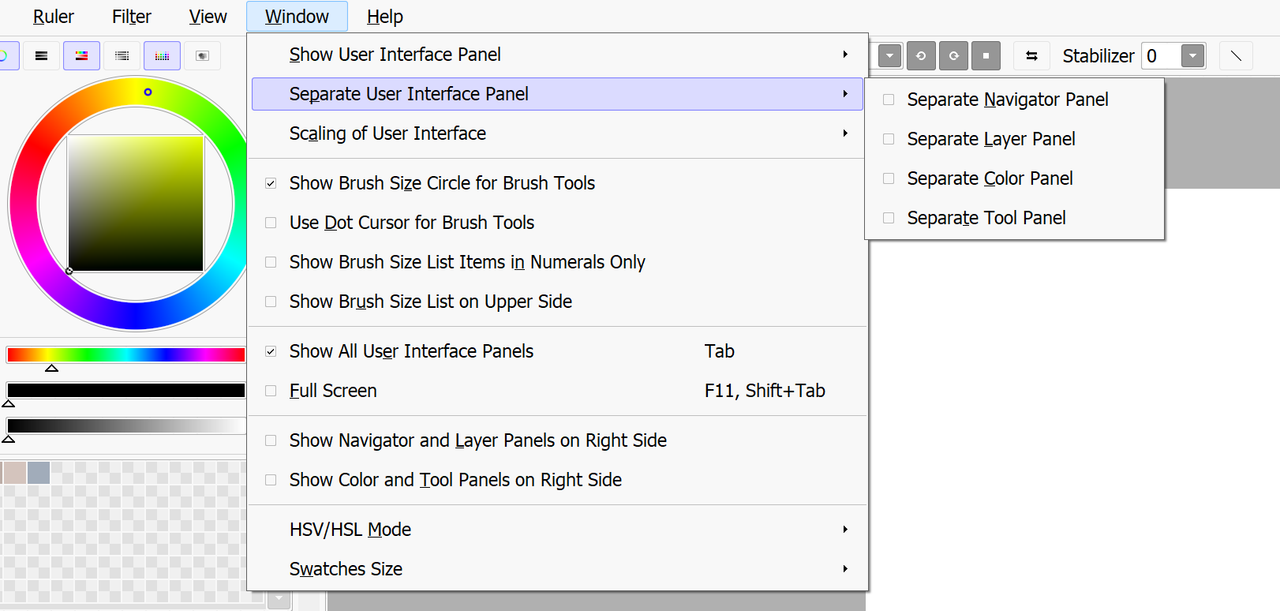
I clicked the "separate x" button and it popped it out on a new window. Try making sure it's unselected?
Paint tool sai helpMay 26, 2020 03:35 PM


Grimm

Darkseeker
 
Posts:7084
#2064770
Give Award
It's not showing up for me :/ I think I may have a different version, which one do you use?
Paint tool sai helpMay 26, 2020 03:37 PM


Former Pack

Neutral
 
Posts:0
#2064773
Give Award
This is the second version, although I'm fairly well versed in the first because I've used it up until about last year. Might actually still have it downloaded on this computer although I think I deleted it to save space. I'd definitely check under anything that says "view" or "windows"

I'll go ahead and see if I still have it but I'd be shocked if I do
Paint tool sai helpMay 26, 2020 03:39 PM


Former Pack

Neutral
 
Posts:0
#2064789
Give Award
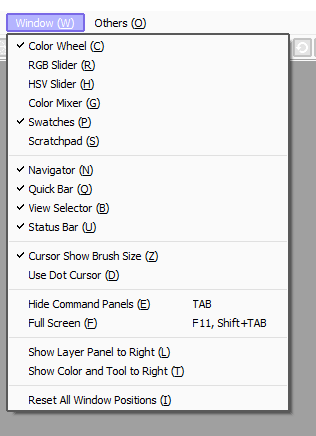
image.png
Dang, I actually do!
Anyway, this is what I have selected and everything's set to the left side and not popped out. If it doesn't work, I'd try to "reset all window positions" and see if that gets you anywhere?
Paint tool sai helpMay 26, 2020 03:45 PM


Grimm

Darkseeker
 
Posts:7084
#2064811
Give Award
For some reason it just didn't want to work, even when I did click that. I removed the program and redownloaded it and it worked
thank you for the help! c: I really do appreciate it
Paint tool sai helpMay 26, 2020 03:46 PM


Former Pack

Neutral
 
Posts:0
#2064814
Give Award
Ah, sorry I wasn't able to be of much help but I'm glad that it's working! If you have any more questions about it feel free to PM me and I'll help to the best of my abilities <3
Paint tool sai helpMay 26, 2020 03:47 PM


Grimm

Darkseeker
 
Posts:7084
#2064818
Give Award
Ah I definitely will <3 thank you!

Forums > Artwork > Art Help
   1 

Refresh