| |

Neutral
|
What coding removes the green border around items? Ex: the chatbox or the daily cp box Also how do you change the color of text in the buttons and boxs? Ex: The daily cp box, "chat" button, "attack" button, "explore" button Also is there a way to code your mouse cursor to be different with your pallette? I think there is as I've seen someone's pallette with a different one. Also how do you change the color of the brown text? Ex: my pack number on my den page is brown still. Also the subject of mail is brown still. Sorry for so many questions. |
|
|
| |

Neutral
|
Venerixen said:
What coding removes the green border around items? Ex: the chatbox or the daily cp box
You need to add the border property to your selectors. Ex (for daily cp box): .errormsg {
background-color:#dd3c3c; border:1px solid #000000;
} .validmsg {
background-color:#7f7f7f; border:1px solid #000000;
}
Venerixen said:
Also how do you change the color of text in the buttons and boxs? Ex: The daily cp box, "chat" button, "attack" button, "explore" button
The selector for "chat", "attack", etc buttons is:
.main {
background-color:#a37575;
}
Now, if you want to change the text color there
button.main td {font-family:arial,sans-serif; color:#000000;}
And if you want the main chat color to be different from the button color, you can add this line:
.saleschat.main {
background-color:#3c0404; border:1px solid #444444;
}
Venerixen said:
Also is there a way to code your mouse cursor to be different with your pallette? I think there is as I've seen someone's pallette with a different one.
This would help * {cursor: url(INSERT CURSOR IMAGE LINK 1),auto;}
a:-webkit-any-link {cursor: url(INSTERT CURSOR IMAGE LINK 2),auto;}
.bsmalltext a:link {cursor: url(INSERT CURSOR IMAGE LINK 3),auto;}
.bsmalltext a:visited {cursor: url(INSERT CURSOR IMAGE LINK 3),auto;}
.iclass {cursor: auto;}
a:-webkit-any-link is for links but you can specify it more by adding it in specific selectors (eg bsmalltext)
"INSERT CURSOR IMAGE LINK X" is the link of the cursor you want to be displayed in your palette.
Venerixen said: Also how do you change the color of the brown text? Ex: my pack number on my den page is brown still. Also the subject of mail is brown still.
This would help:
.mainline {font-family:arial,sans-serif; color:#949494;} .smalltext {font-family:arial,sans-serif; color:#949494;} .mainline a:link {font-family:arial,sans-serif; color:#949494;}
.mainline a:visited {font-family:arial,sans-serif; color:#949494;}
.mainline a:hover {font-family:arial,sans-serif; color:#b9b9b9;} |
|
|
| |
Neutral
|
Thank you it should ^-^
Dire said:
Venerixen said:
What coding removes the green border around items? Ex: the chatbox or the daily cp box
You need to add the border property to your selectors. Ex (for daily cp box): .errormsg {
background-color:#dd3c3c; border:1px solid #000000;
} .validmsg {
background-color:#7f7f7f; border:1px solid #000000;
}
Venerixen said:
Also how do you change the color of text in the buttons and boxs? Ex: The daily cp box, "chat" button, "attack" button, "explore" button
The selector for "chat", "attack", etc buttons is:
.main {
background-color:#a37575;
}
Now, if you want to change the text color there
button.main td {font-family:arial,sans-serif; color:#000000;}
And if you want the main chat color to be different from the button color, you can add this line:
.saleschat.main {
background-color:#3c0404; border:1px solid #444444;
}
Venerixen said:
Also is there a way to code your mouse cursor to be different with your pallette? I think there is as I've seen someone's pallette with a different one.
This would help * {cursor: url(INSERT CURSOR IMAGE LINK 1),auto;}
a:-webkit-any-link {cursor: url(INSTERT CURSOR IMAGE LINK 2),auto;}
.bsmalltext a:link {cursor: url(INSERT CURSOR IMAGE LINK 3),auto;}
.bsmalltext a:visited {cursor: url(INSERT CURSOR IMAGE LINK 3),auto;}
.iclass {cursor: auto;}
a:-webkit-any-link is for links but you can specify it more by adding it in specific selectors (eg bsmalltext)
"INSERT CURSOR IMAGE LINK X" is the link of the cursor you want to be displayed in your palette.
Venerixen said: Also how do you change the color of the brown text? Ex: my pack number on my den page is brown still. Also the subject of mail is brown still.
This would help:
.mainline {font-family:arial,sans-serif; color:#949494;} .smalltext {font-family:arial,sans-serif; color:#949494;} .mainline a:link {font-family:arial,sans-serif; color:#949494;}
.mainline a:visited {font-family:arial,sans-serif; color:#949494;}
.mainline a:hover {font-family:arial,sans-serif; color:#b9b9b9;}
|
|
|
| |
Neutral
|
I have another question. How you change the white background when the drop down menu opens? Ex: hovering over pack. Sorry if thats confusing |
|
|
| |
Neutral
|
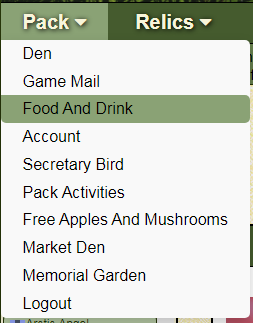
The white part there right? .dropdown-content {background-color: #999999;} |
|
|
| |
Neutral
|
Yes thank you and the writing when my wolves are in battle is still partially green how would I fix that? ^-^ Thnk you so much for helping me
Dire said:
The white part there right? .dropdown-content {background-color: #999999;}
|
|
|
| |
Neutral
|
You're welcome :)
About the battle text, you're asking for the Wolf and NPC names there right?
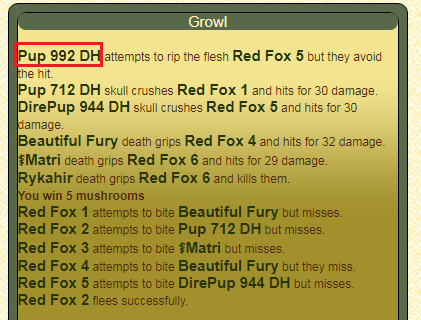 Try that (the color should be the same in both selectors) : div.fscreen font font b {color:#878787 !important;} div.fscreen font font a:link {color:#878787 !important;} |
|
|
| |
Neutral
|
Yes thank you so much :D and last 2 question I think at least XD I seen sparkles on some peoples pallettes is there a code I can add to do that? Also I know radial and linear gradient what other gradients are there?
Dire said:
You're welcome :)
About the battle text, you're asking for the Wolf and NPC names there right?
Try that (the color should be the same in both selectors) : div.fscreen font font b {color:#878787 !important;} div.fscreen font font a:link {color:#878787 !important;}
|
|
|
| |

Darkseeker
|
Hi Venerixen, I didn't use a special code for the sparkles. I made a GIF and then inserted the URL into the background property where I wanted it to be. I also made the image a smaller size and made it repeat. Here is one of the codes I used: .primary { background-image: linear-gradient(to bottom, rgba(255, 255, 255, 0), rgba(186, 255, 201, 0), rgba(186, 225, 255, 0), rgba(254, 200, 216, 0)), url(LINK); background-color: rgba(255, 255, 255, 0.45); background-size: 75px 75px; background-repeat: repeat; } |
|
|
| |
Neutral
|
Venerixen said:
Yes thank you so much :D and last 2 question I think at least XD I seen sparkles on some peoples pallettes is there a code I can add to do that?
I don't really know if there is a property that adds sparkles on a selector, but you can make an image in an image editor and use the background-image property to display in in your selector. Ex: .wolfheader {background-image:url(INSERT IMAGE DIRECT LINK HERE);}
Venerixen said:
Also I know radial and linear gradient what other gradients are there?
There is a third type of gradient: the conic gradient. |
|
|

 Spring Month: 1
  Day
Day  Flood
Flood