Wolf Play Game

Wolf Play Game
 Spring Month: 1   Day   Heavy Rain
    

Chatbox
 Winterfell
03:19:57 Winter
I now have every crystalline dye in the game <33 I will just hoard them xD
 Moonfall
03:00:55 Many moons, one me
I don't quite know what to do with her? Soup and try again? Or keep and see what happens?
-WP Click-
 Tonneoshet
02:26:09 Uncle Tony
Wish I had more den space, but I barely want half the wolves i keep xD
Now my ALLIANCE slots on the other hand-
 Andypaws
02:18:44 Andy [he/they]
Moonfall

oh yeah some people have an insane amount of den space
 Moonfall
02:16:54 Many moons, one me
I will say my flabbers do be ghasted when I visit other dens and see they have over 1000 wolves AND den space left over
 Moonfall
02:14:43 Many moons, one me
Andy
Of course!! Another thing is ff you have den card explore or den card stats selected in your own den, it'll show other dens that way
 Andypaws
02:14:23 Andy [he/they]
-WP Click- I found this in the suggestions forum
 Andypaws
02:13:33 Andy [he/they]
thank you both!
 Sabbath
02:12:49 Rook
Ah, I always forget about the different den views. I always just leave my den the way it is xD
 Moonfall
02:12:42 Many moons, one me
Looks like you have 13 wolves with 6 open spaces, so 19 all together
 Moonfall
02:11:15 Many moons, one me
Andy, you could put it into view>den card explore or den card stats then just under it at the top it'll tell you how many wolves you have. Then scrolling down to the very bottom it'll tell you how many slots are open
 Sabbath
02:09:37 Rook
I don't know if there's just a number somewhere though e.e
 Sabbath
02:09:10 Rook
Andy
I put my pack ID into trading post and then add up the number of results + number of empty spaces at the bottom of my den.
 Andypaws
02:07:44 Andy [he/they]
is there a way to see my overall den space outside of individually counting my wolves?
 Moonfall
02:06:02 Many moons, one me
Girl... You need to go into labor. I beg -WP Click-
 Moonfall
02:02:27 Many moons, one me
Oh nice, all 4 pups I free ranged got into sanctuary
 Falling Snow
02:00:39 Snow
Renee
Sleep? What's this magical term called sleep?
 Sabbath
01:57:48 Rook
I love the otso base so much
 Sabbath
01:57:37 Rook
i need my wolves to stop giving me cute pups if they don't have boosts </3
-WP Click-
 lovrenee
01:56:17 renee
@Snow
I'm currently procrastinating sleep lol

Refresh

You must be a registered member for more
than 1 day before you can use our chatbox.


Quests

Embark on a Quest.

Alliance Battles

Join an Alliance.

Challenges

Hourly Damage Variances
Coyote : +5
Black Bear : -3
Mountain Lion : +2


WolfPlay Game
Chatbox
 Winterfell
03:19:57 Winter
I now have every crystalline dye in the game <33 I will just hoard them xD
 Moonfall
03:00:55 Many moons, one me
I don't quite know what to do with her? Soup and try again? Or keep and see what happens?
-WP Click-
 Tonneoshet
02:26:09 Uncle Tony
Wish I had more den space, but I barely want half the wolves i keep xD
Now my ALLIANCE slots on the other hand-
 Andypaws
02:18:44 Andy [he/they]
Moonfall

oh yeah some people have an insane amount of den space
 Moonfall
02:16:54 Many moons, one me
I will say my flabbers do be ghasted when I visit other dens and see they have over 1000 wolves AND den space left over
 Moonfall
02:14:43 Many moons, one me
Andy
Of course!! Another thing is ff you have den card explore or den card stats selected in your own den, it'll show other dens that way
 Andypaws
02:14:23 Andy [he/they]
-WP Click- I found this in the suggestions forum
 Andypaws
02:13:33 Andy [he/they]
thank you both!
 Sabbath
02:12:49 Rook
Ah, I always forget about the different den views. I always just leave my den the way it is xD
 Moonfall
02:12:42 Many moons, one me
Looks like you have 13 wolves with 6 open spaces, so 19 all together
 Moonfall
02:11:15 Many moons, one me
Andy, you could put it into view>den card explore or den card stats then just under it at the top it'll tell you how many wolves you have. Then scrolling down to the very bottom it'll tell you how many slots are open
 Sabbath
02:09:37 Rook
I don't know if there's just a number somewhere though e.e
 Sabbath
02:09:10 Rook
Andy
I put my pack ID into trading post and then add up the number of results + number of empty spaces at the bottom of my den.
 Andypaws
02:07:44 Andy [he/they]
is there a way to see my overall den space outside of individually counting my wolves?
 Moonfall
02:06:02 Many moons, one me
Girl... You need to go into labor. I beg -WP Click-
 Moonfall
02:02:27 Many moons, one me
Oh nice, all 4 pups I free ranged got into sanctuary
 Falling Snow
02:00:39 Snow
Renee
Sleep? What's this magical term called sleep?
 Sabbath
01:57:48 Rook
I love the otso base so much
 Sabbath
01:57:37 Rook
i need my wolves to stop giving me cute pups if they don't have boosts </3
-WP Click-
 lovrenee
01:56:17 renee
@Snow
I'm currently procrastinating sleep lol


Refresh

You must be a member for more than 1 day before you can chat.

Forums

→ WolfPlay is a fun game! Sign Up Now!


My Subscriptions
My Bookmarks
My Topics
Latest Topics
Following

Forums > Member Help
   1 

exploringAugust 2, 2024 05:44 PM


Former Pack

Neutral
 
Posts:0
#3047188
Give Award
I've found all the spaces in level 1 exploring now im just completing all the battles but Im having so much trouble finding them ( wished I woulda just done the battles as i found them...) is there like a map or anything? Im using the white lines as a guide but still have trouble please help been stuck like this for 2 days
exploringAugust 2, 2024 05:55 PM


Ecifircas

Forum Moderator
Neutral
 
Posts:860
#3047196
Give Award

1
Yes!

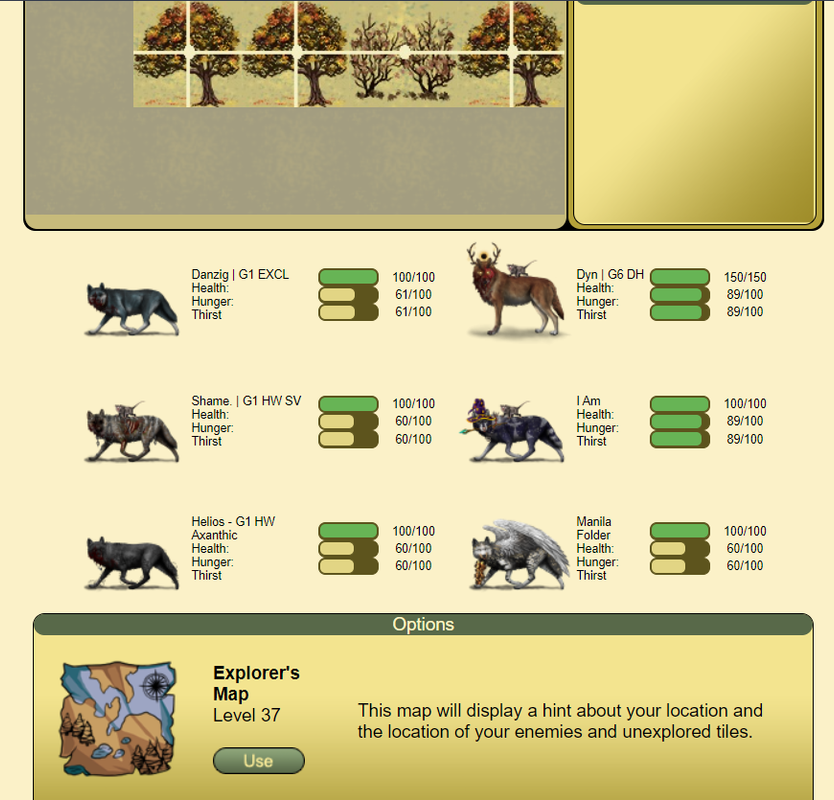
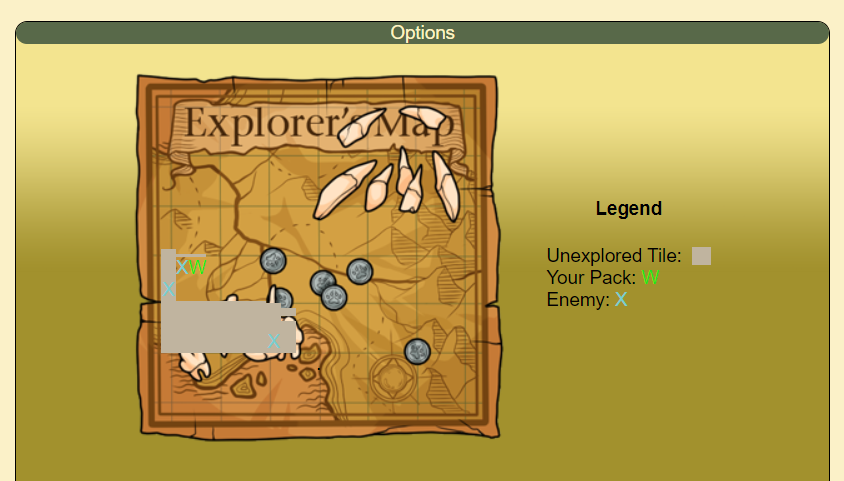
Under Realm > Marketplace > Barter, you can buy a Explorer's Map for 30 mushrooms. The Explorer's Map reveals the location of any remaining enemies and untread tiles.

Once purchased, you can use it from here:image.png

And it looks like this:
image.png

Completing the battles as you go is certainly for the best. Each level has 400 tiles. Attempt to find the undefeated enemies with the help of the Explorer's Map but if it's too difficult, you can always replay the level from the Explore page.

Oh, and do note that the Explorer's Map doesn't update after it's used so try to keep a mental note of what direction you've moved your pack in since stepping off the tile you used it on and trying to get to an untread tile or enemy.

Edited at August 2, 2024 05:57 PM by Ecifircas
exploringAugust 2, 2024 11:27 PM


Former Pack

Neutral
 
Posts:0
#3047263
Give Award
You are amazing thank you
Ecifircas said:
Yes!

Under Realm > Marketplace > Barter, you can buy a Explorer's Map for 30 mushrooms. The Explorer's Map reveals the location of any remaining enemies and untread tiles.

Once purchased, you can use it from here:image.png

And it looks like this:
image.png

Completing the battles as you go is certainly for the best. Each level has 400 tiles. Attempt to find the undefeated enemies with the help of the Explorer's Map but if it's too difficult, you can always replay the level from the Explore page.

Oh, and do note that the Explorer's Map doesn't update after it's used so try to keep a mental note of what direction you've moved your pack in since stepping off the tile you used it on and trying to get to an untread tile or enemy.


Forums > Member Help
   1 

Refresh